4. Risk And Operations
The Risk & Operations section is used to monitor the financial value and risk of open trades and to support operational activities such as hedging, market data, physical movements, logistics, contracts, and documents.
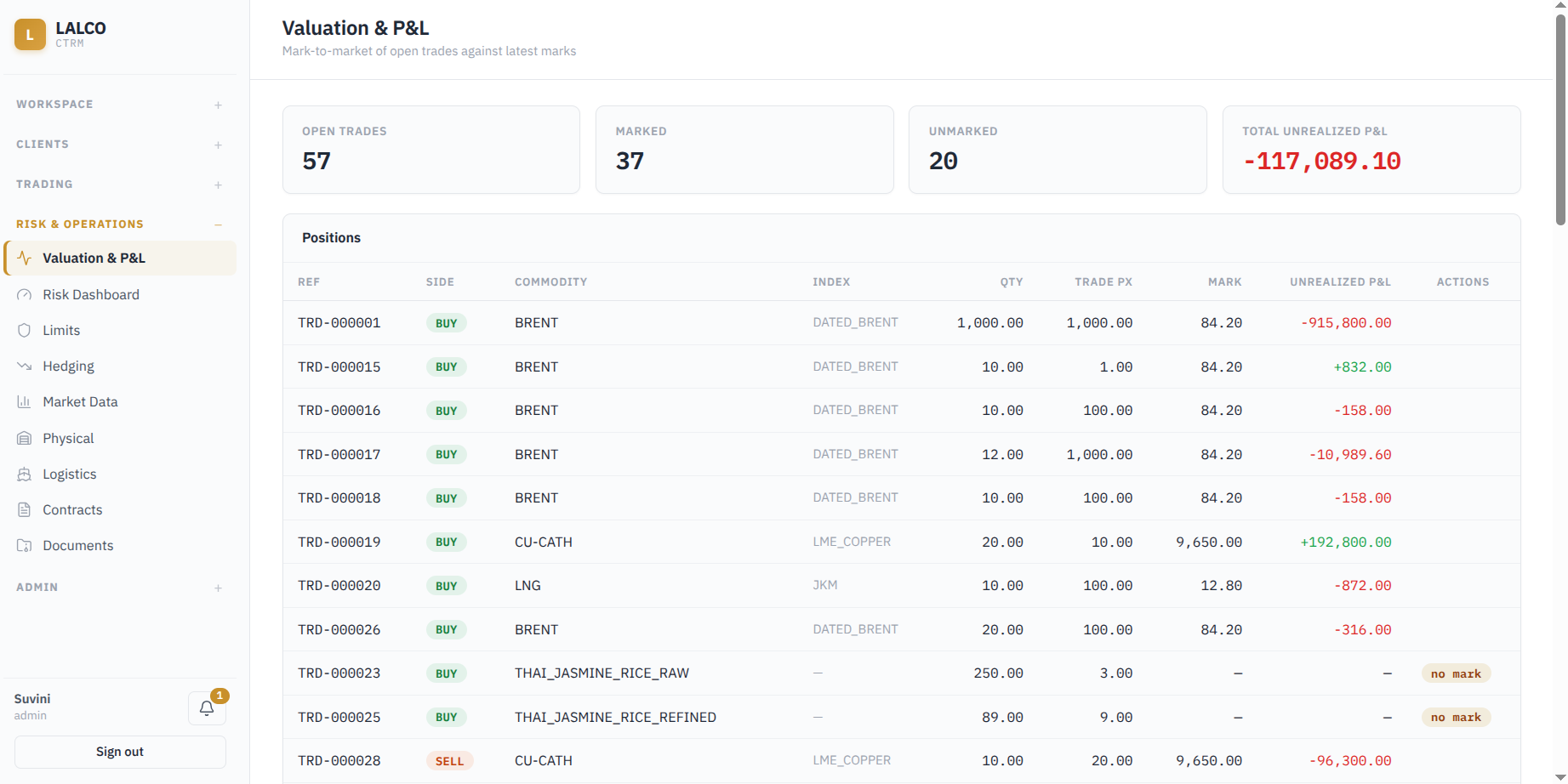
4.1 Valuation & P&L
Shows the current value of open trades by comparing the original trade price with the latest available market price. This helps users identify the unrealized profit or loss on each open position.
Summary Cards
-
Open Trades – Total number of trades that are currently open.
-
Marked – Open trades that have an available market price and can therefore be valued.
-
Unmarked – Open trades for which a market price is not currently available.
-
Total Unrealized P&L – Combined unrealized profit or loss of the marked open positions.
Position Information
-
Ref – Unique trade reference number.
-
Side – Indicates whether the position is a Buy or Sell.
-
Commodity – Commodity involved in the trade.
-
Index – Market price/index used to value the commodity.
-
Qty – Quantity of the open position.
-
Trade Px – Price at which the trade was originally entered.
-
Mark – Latest market price used to value the position.
-
Unrealized P&L – Current estimated profit or loss of the open position
Unrealized P&L Calculation
- For buy position
Unrealized P&L = (Mark Price − Trade Price) × Quantity - For sell position
Unrealized P&L = (Trade Price − Mark Price) × Quantity - Total Unrealized P&L
Total Unrealized P&L = Sum of the Unrealized P&L of all marked open positions
Marked and Unmarked Trades
A trade can only have Unrealized P&L calculated when a valid Mark Price is available.
If no market price/index is available, the trade is shown as No Mark, and its Unrealized P&L cannot currently be calculated.
4.2 Risk Dashboard
The Risk Dashboard provides an overall view of the company’s current trading positions and risk exposure across open trades.
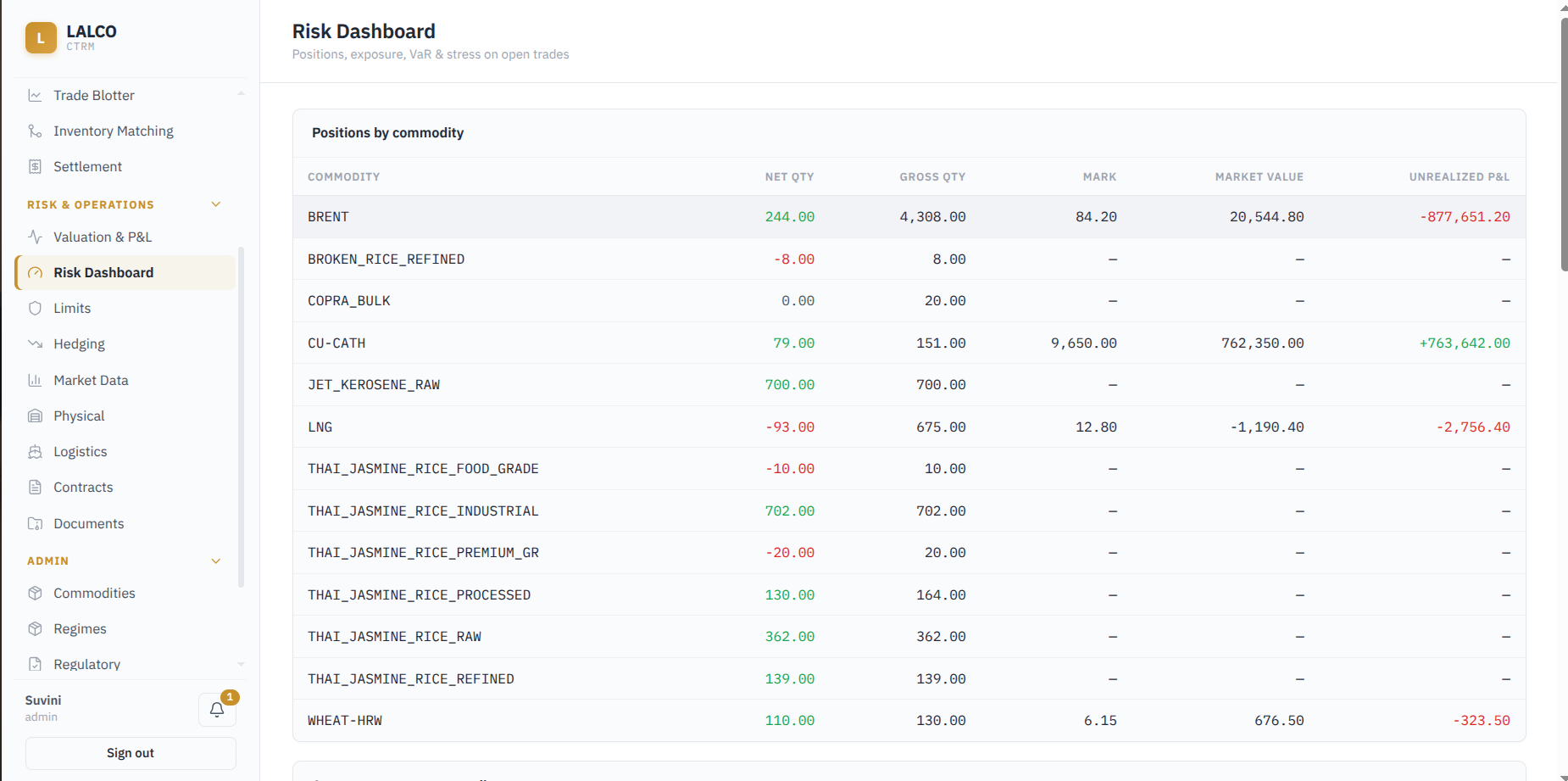
Positions by Commodity
The system groups open trades by commodity and shows the overall position for each one.
- Commodity – Commodity being monitored.
- Net Qty – Remaining position after Buy and Sell quantities are offset against each other.
- Gross Qty – Total quantity traded without offsetting Buy and Sell positions.
- Mark – Latest market price used to value the commodity.
- Market Value – Current value of the net position based on the latest market price.
- Unrealized P&L – Estimated profit or loss on the open positions based on current market prices.
Calculations
1. Net Quantity
Net Qty = Total Buy Quantity − Total Sell Quantity
- A positive Net Qty indicates a net long/buy position.
- A negative Net Qty indicates a net short/sell position.
- A value of 0 means the Buy and Sell quantities are fully offset.
2.Gross Quantity (shows the overall trading activity without offsetting Buy and Sell positions.)
Gross Qty = Total Buy Quantity + Total Sell Quantity
3. Market Value
Market Value = Net Quantity × Mark Price
Company exposure vs credit
This section shows the current open exposure of each company compared with its assigned credit limit. It helps users identify companies that are approaching or exceeding their credit limits.
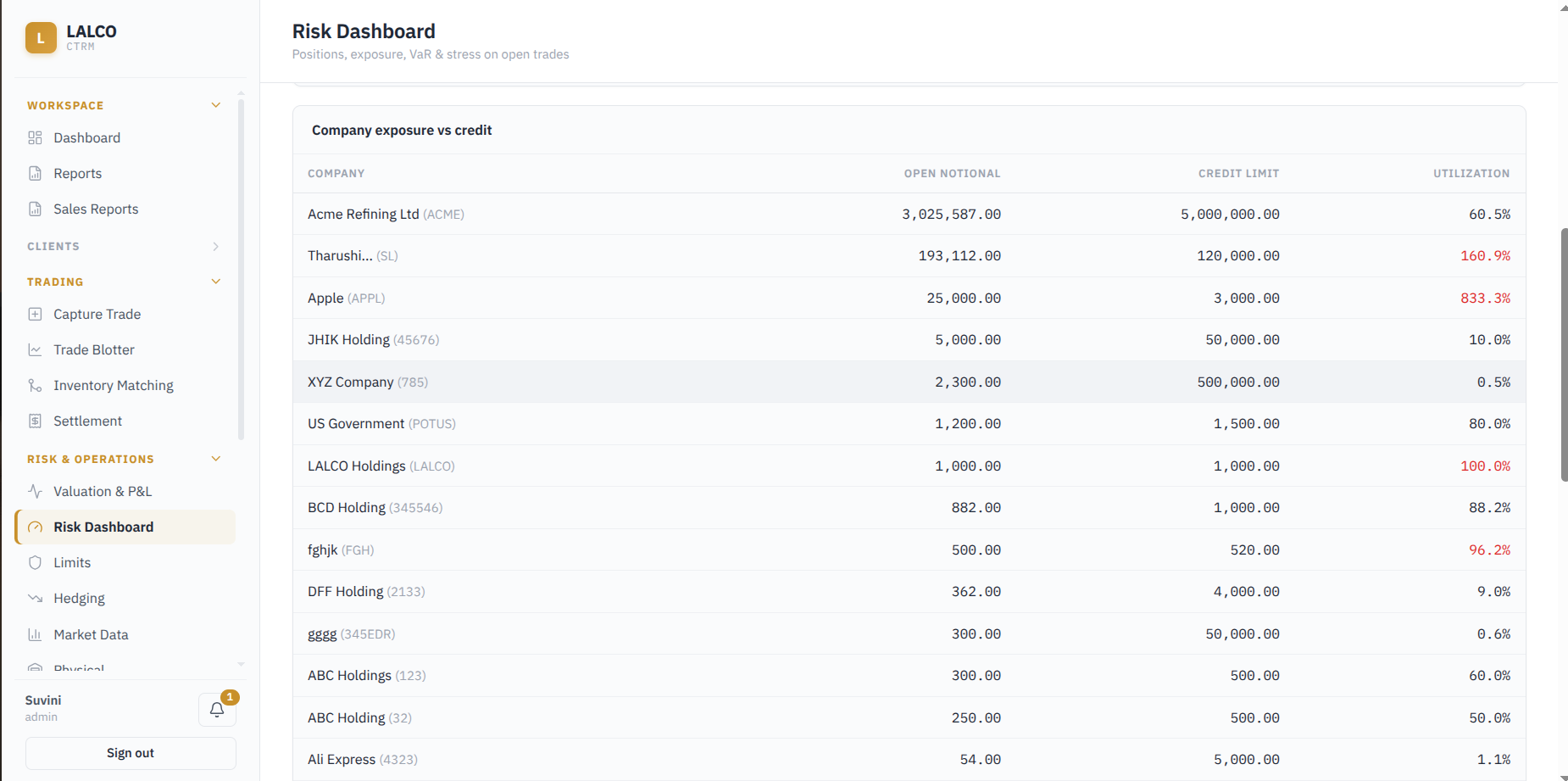
- Company - Name and code of the company.
- Open Notional - Total notional value of the company's currently open trades.
- Credit limit - Maximum credit/exposure limit assigned to the company.
- Utilization - Percentage of the credit limit currently being used.
Calculations
1.Utilization
Utilization (%) = (Open Notional ÷ Credit Limit) × 100
Risk Indication by Utilization: The utilization percentage helps identify the company's credit position:
- Below 100% – Open exposure is within the credit limit.
- 100% – The credit limit is fully utilized.
- Above 100% – Open exposure exceeds the credit limit.
Value at Risk
Estimates the potential loss of the current open trading positions over a one-day period based on the selected confidence level and market volatility.

Confidence - The probability level used to estimate the potential loss. (99% or 95%)
Annual Volatility – The annualized volatility used to estimate potential price movements
Stress test
4.3 Limits
Used to define position and exposure limits. These limits are enforced when trades are captured to help control the level of risk and exposure.
Existing Limits
- Name - Name of the limit
- Scope - What limit applies to. (Commodity, counterparty, Book, Global)
- Target - The specific commodity or counterparty to which the limit applies
- Metric - The measurement used for the limit, such as Net Quantity or Gross Quantity.
- Max - Maximum value allowed for the selected metric.
- Status - Shows whether the limit is currently Active.
- Actions - Allows the user to edit the max credit limit and disable the limit. (Active or inactive)
Active Breaches
Shows limits where the current value has exceeded the configured maximum limit.
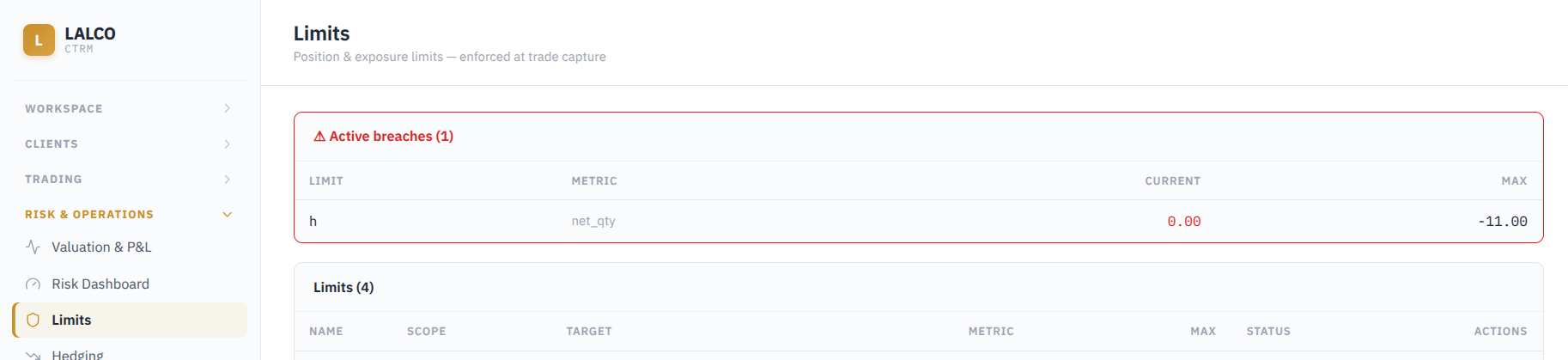
- Limit - Name of the limit that has been breached.
- Metric - The measurement used for the limit, such as Net Quantity or Gross Quantity.
- Current - Current value of the selected metri
- Max - Maximum value configured for the limit
Create Limit
- Name
- Scope
- Book Name
- Metric
- Max value
4.2 Hedging
Allows users to monitor, manage, and evaluate hedge strategies and their effectiveness across various commodities and financial instruments. Allows traders, risk managers, and operations staff to align financial derivative instruments (futures, options, swaps) against physical commodity exposures (e.g., Rice, Wheat).
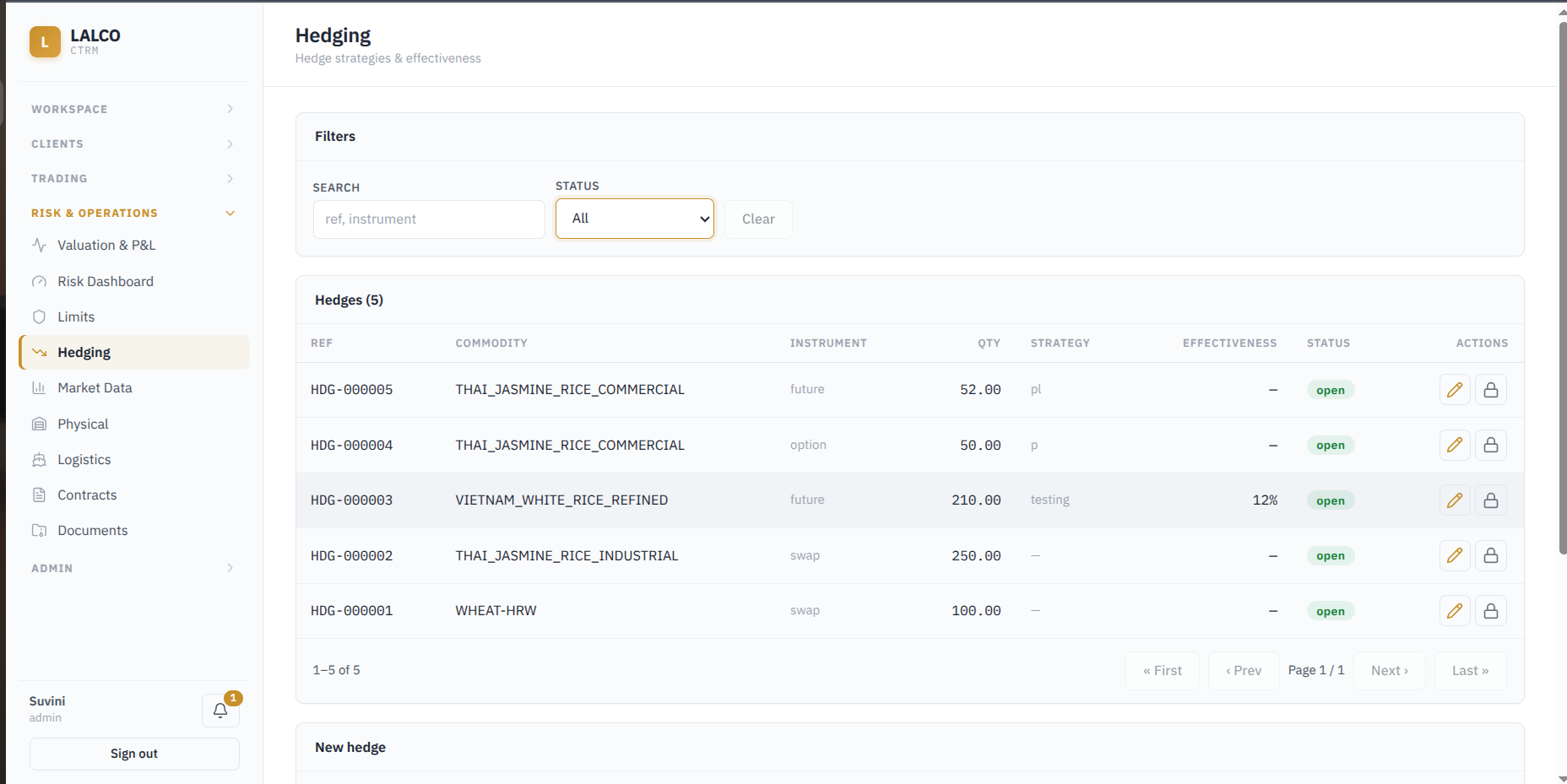
Filters
- Search by reference and instrument
- Status :
- Open (The hedge is currently active. The derivative contract has been executed but not yet settled or offset, meaning it is still actively managing the price risk for the underlying physical commodity.)
- Close (The hedge has been completed. The derivative contract has expired, been sold, or settled,it is no longer actively covering any current risk.)
View Hedges
- Ref - Unique reference of the hedge
- Commodity - The target physical commodity exposure being hedged
- Instrument - Financial derivative type used (Future, Option, Swap)
- Qty - volume or quantity (negative value means a sell/short position)
- Strategy - custom tagging
- Effectiveness - Percentage showing how well the hedge protects against price changes
- Status - Shows if the hedge is currently active (Open) or completed (Closed)
- Actions - Edit or close a hedge
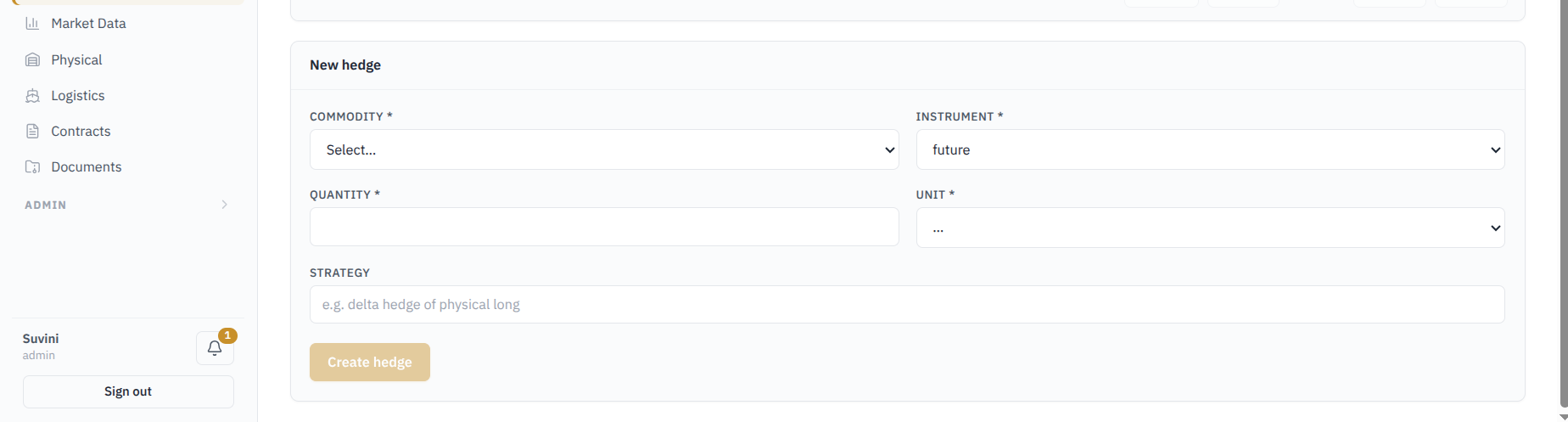
Create a new hedge
-
Commodity - The physical commodity you are hedging Required
-
Instrument -The type of derivative contract (e.g., Future, Option, Swap) Required
-
Quantity - Enter the numerical amount of the commodity to hedge. Required
-
Unit - Select the measurement unit for the quantity (e.g., tons, bushels, lots) Required
-
Strategy - Add an optional tag or description for your hedging approach
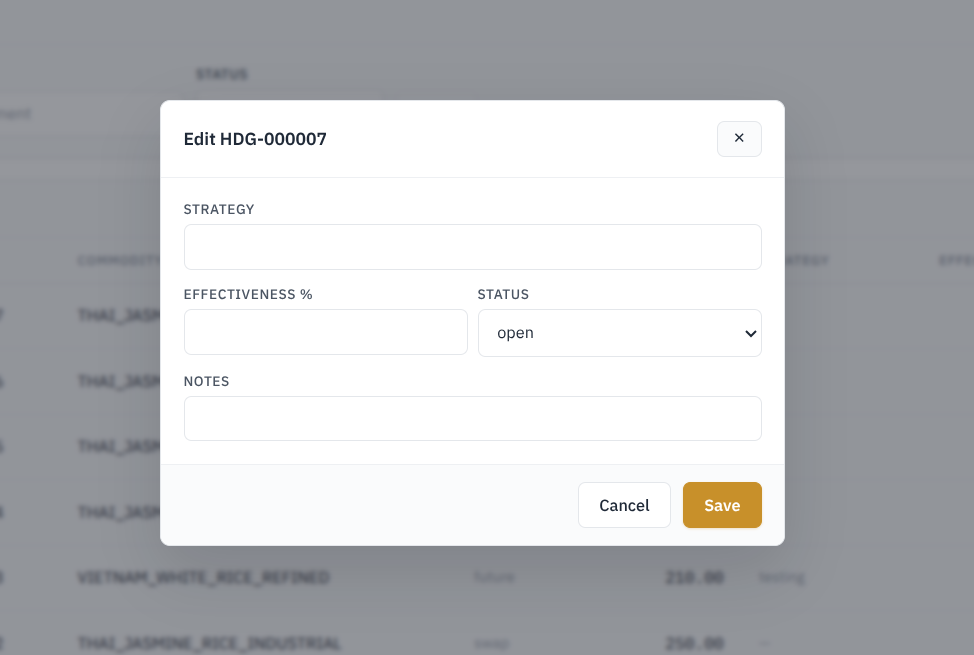
Edit a hedge
-
Strategy - Update the custom tag or description for your hedging approach
-
Effectiveness % - Enter or update the numerical score showing how well the hedge is performing
-
Status - Change the current state of the hedge (e.g., from Open to Closed)
-
Notes - Add any relevant comments, details, or context about this specific record