District
Page Overview
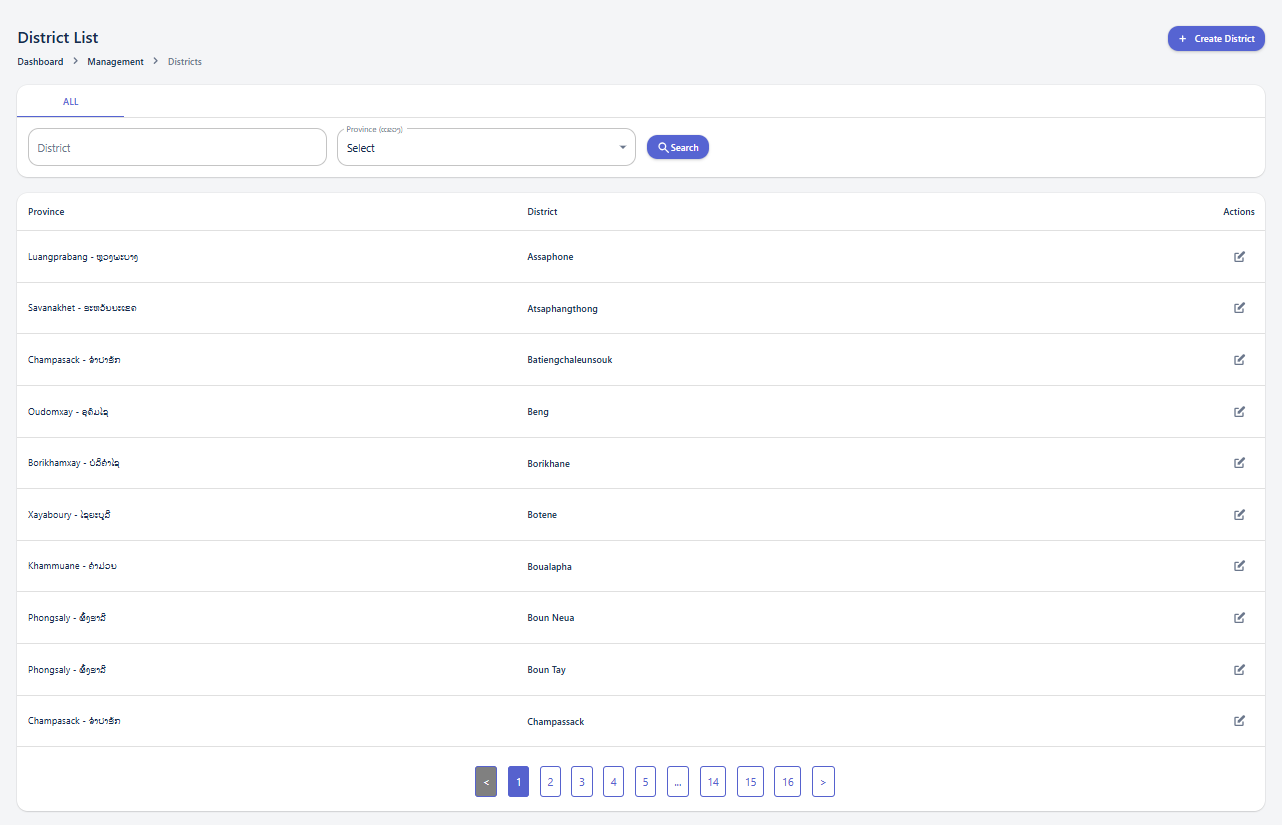
The "District List" page provides a comprehensive view of all districts managed within the system. It includes dashboard navigation, search and filter options, and a detailed table displaying various district attributes.
-
Search and Filter Panel: Helps you narrow down the displayed list of districts based on specific criteria.
-
District Details Table: Displays the list of districts with their respective information, including the associated Province and the District name.
Using the Search and Filter Panel
The search and filter panel allows you to quickly find specific districts by applying various criteria.
Available Filters:
-
District: Enter a specific district name to find an exact match.
District Create
The "District Create" page allows users to add new district entries to the system. It provides input fields for essential district information.
-
District information panel: This section contains the fields necessary to define a new district.
Creating a New District
To create a new district, fill in the following fields:
-
Province (ແຂວງ): (Mandatory field) Select the province to which this district belongs from the dropdown list.
-
District name: (Mandatory field) Enter the name of the district.
After filling in the required information, click the "Create District" button. Upon successful creation, a popup message "District created!" will appear, and the system will automatically navigate to the "District List" page. If you wish to discard the entry, click the "Cancel" button.