Call History Screen
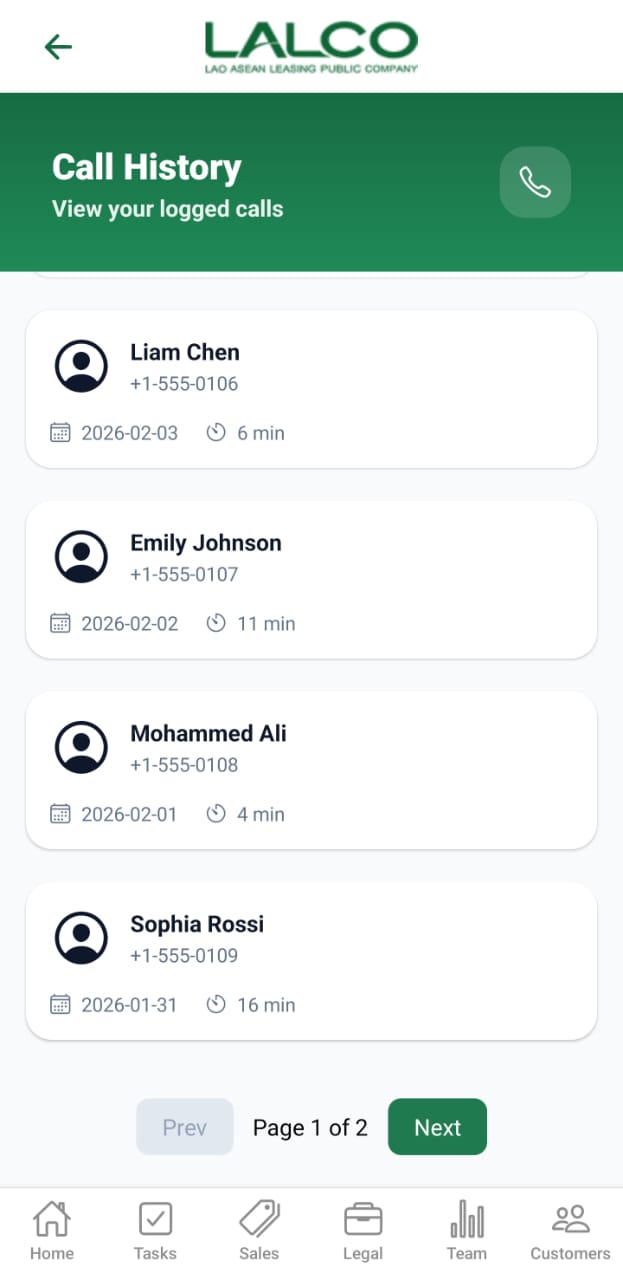
The Call History Screen allows staff to view and track all logged customer calls, including call duration and date. This helps monitor communication history and follow-ups.
Access Path
Call History List Screen
Overview
Displays a list of all recorded calls made by the user.
Header Section
Page Title
Call History
Description
Call Icon 📞
-
Used to initiate or access calling features
Call List
Each card represents a logged call.
Information Displayed
-
Customer Name
-
Phone Number
-
Call Date
-
Call Duration
Example
+1-555-0106
Date: 2026-02-03
Duration: 6 min
Pagination
Located at the bottom of the screen.
Controls
Example
How to Use
View Call History
-
Open Call History from menu
-
Scroll through the list
-
Use pagination to navigate
Analyze Calls
-
Check call duration
-
Review recent interactions
-
Identify follow-up needs
Bottom Navigation Bar
Provides quick access to main modules:
-
Home
-
Tasks
-
Sales
-
Legal
-
Team
-
Customers
Empty State (Optional)
Notes
-
Calls are listed in descending order (latest first)
-
Data helps track staff communication performance
💡 Tip:
Use this screen daily to ensure no customer follow-up is missed.