# Capture Screen

[![96524963-6790-4bfd-bea5-e33482b83e52.jpg](http://wiki.lalco.la/uploads/images/gallery/2026-03/scaled-1680-/96524963-6790-4bfd-bea5-e33482b83e52.jpg)](http://wiki.lalco.la/uploads/images/gallery/2026-03/96524963-6790-4bfd-bea5-e33482b83e52.jpg)

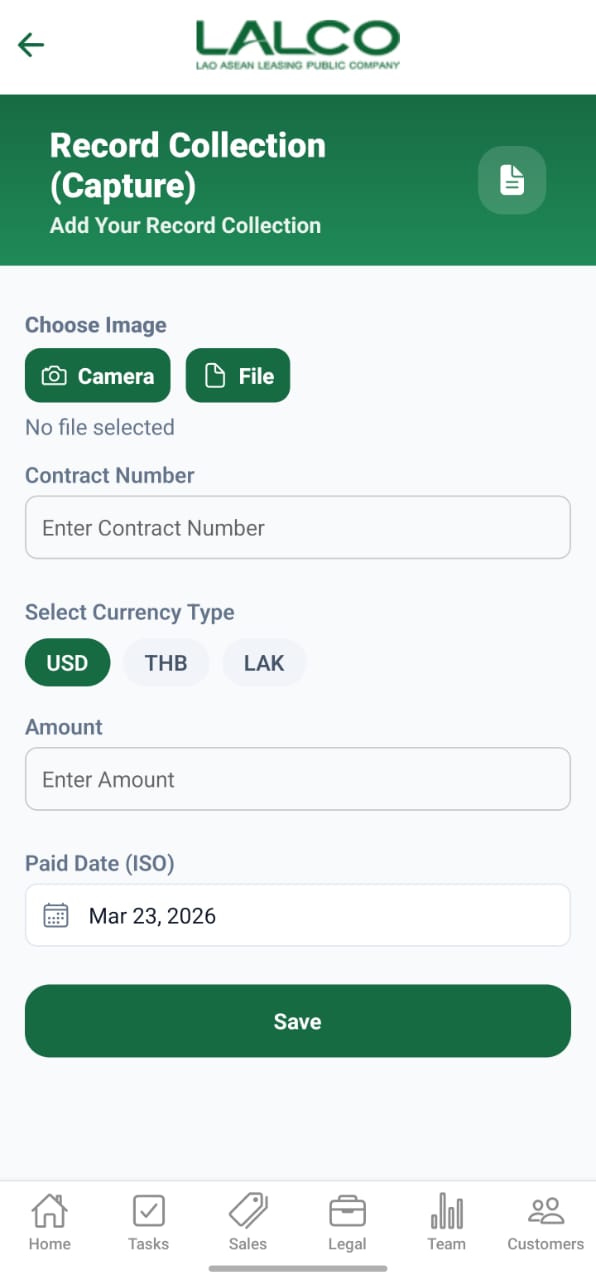
The **Record Collection (Capture) Screen** allows staff to record payment collections by capturing proof (image/file) and entering transaction details such as contract number, amount, and payment date.

---

# Image Upload Section

### Choose Image

Users can attach proof of collection using:

- **Camera** → Capture image directly
- **File** → Upload from device

---

### File Status

<div class="relative w-full mt-4 mb-1" id="bkmrk-no-file-selected"><div class=""><div class="relative"><div class="h-full min-h-0 min-w-0"><div class="h-full min-h-0 min-w-0"><div class="border border-token-border-light border-radius-3xl corner-superellipse/1.1 rounded-3xl"><div class="h-full w-full border-radius-3xl bg-token-bg-elevated-secondary corner-superellipse/1.1 overflow-clip rounded-3xl lxnfua_clipPathFallback"><div class="pe-11 pt-3"><div class="relative z-0 flex max-w-full"><div class="q9tKkq_viewer cm-editor z-10 light:cm-light dark:cm-light flex h-full w-full flex-col items-stretch ͼ5 ͼj" dir="ltr" id="bkmrk-no-file-selected-1"><div class="cm-scroller"><div class="cm-content q9tKkq_readonly">No file selected</div></div></div></div></div></div></div></div></div><div class=""><div class="">  
</div></div></div></div></div>Displays whether a file has been attached.

---

# Form Fields

### Contract Number

Enter the contract number related to the payment

---

### Select Currency Type

Choose one:

- **USD**
- **THB**
- **LAK**

---

### Amount

Enter the collected amount

---

### Paid Date (ISO)

Select the payment date

Example:

<div class="relative w-full mt-4 mb-1" id="bkmrk-mar-23%2C-2026"><div class=""><div class="relative"><div class="h-full min-h-0 min-w-0"><div class="h-full min-h-0 min-w-0"><div class="border border-token-border-light border-radius-3xl corner-superellipse/1.1 rounded-3xl"><div class="h-full w-full border-radius-3xl bg-token-bg-elevated-secondary corner-superellipse/1.1 overflow-clip rounded-3xl lxnfua_clipPathFallback"><div class="pe-11 pt-3"><div class="relative z-0 flex max-w-full"><div class="q9tKkq_viewer cm-editor z-10 light:cm-light dark:cm-light flex h-full w-full flex-col items-stretch ͼ5 ͼj" dir="ltr" id="bkmrk-mar-23%2C-2026-1"><div class="cm-scroller"><div class="cm-content q9tKkq_readonly">Mar 23, 2026</div></div></div></div></div></div></div></div></div><div class=""><div class="">  
</div></div></div></div></div>---

# Action

### Save

Saves the collection record to the system

---

# How to Use

### Record Collection

1. Upload image using **Camera** or **File**
2. Enter **Contract Number**
3. Select **Currency Type**
4. Enter **Amount**
5. Select **Paid Date**
6. Tap **Save**

---

# Notes

- Always attach **proof of payment**
- Ensure contract number is correct
- Verify amount before saving

---

# Navigation

<div class="relative w-full mt-4 mb-1" id="bkmrk-menue-%E2%86%92-capture"><div class=""><div class="relative"><div class="h-full min-h-0 min-w-0"><div class="h-full min-h-0 min-w-0"><div class="border border-token-border-light border-radius-3xl corner-superellipse/1.1 rounded-3xl"><div class="h-full w-full border-radius-3xl bg-token-bg-elevated-secondary corner-superellipse/1.1 overflow-clip rounded-3xl lxnfua_clipPathFallback"><div class="pe-11 pt-3"><div class="relative z-0 flex max-w-full"><div class="q9tKkq_viewer cm-editor z-10 light:cm-light dark:cm-light flex h-full w-full flex-col items-stretch ͼ5 ͼj" dir="ltr" id="bkmrk-menue-%E2%86%92-capture-1"><div class="cm-scroller"><div class="cm-content q9tKkq_readonly">Menue → Capture</div></div></div></div></div></div></div></div></div></div></div></div>