# Home Screen

[<span style="background-color: rgb(241, 196, 15);">![screenshot-20260316-115418-expo-go-jpg.jpg](http://wiki.lalco.la/uploads/images/gallery/2026-03/scaled-1680-/screenshot-20260316-115418-expo-go-jpg.jpg)</span>](http://wiki.lalco.la/uploads/images/gallery/2026-03/screenshot-20260316-115418-expo-go-jpg.jpg)

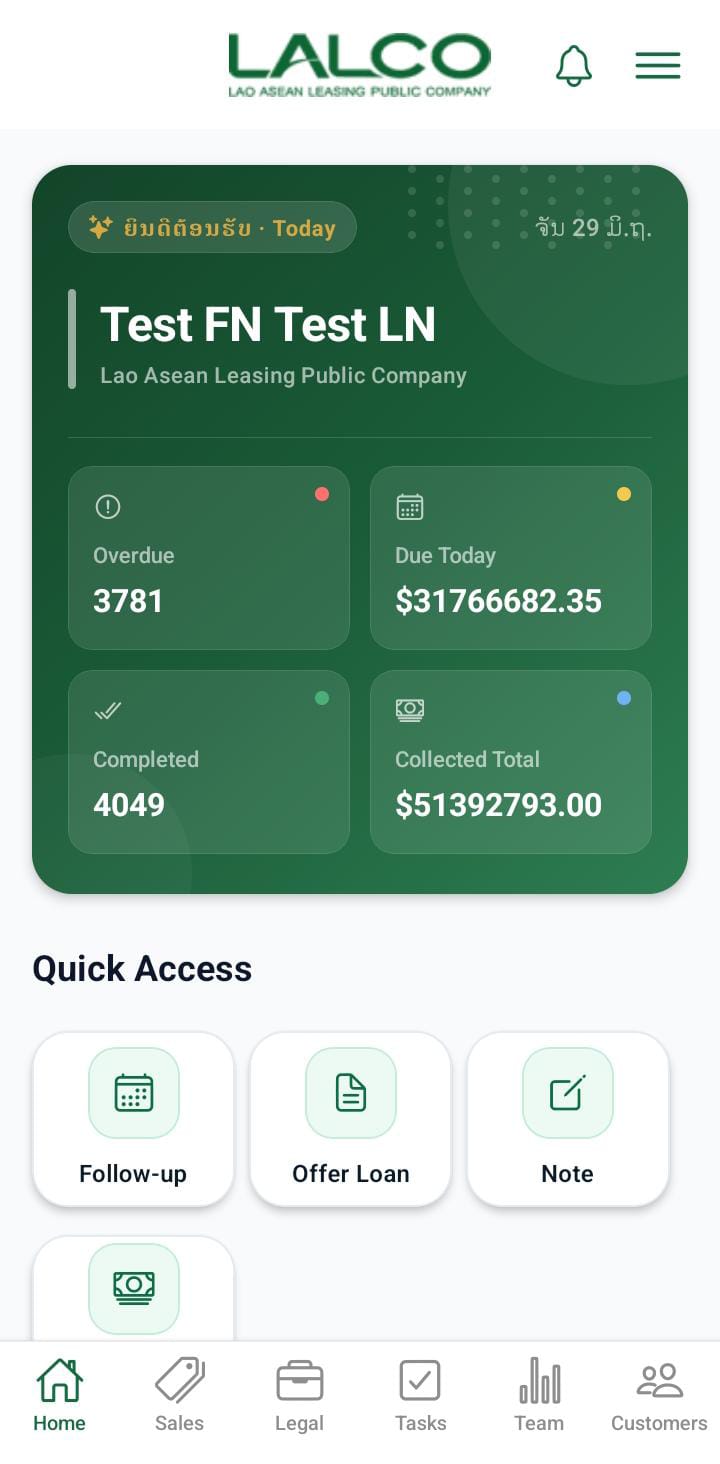
The **Home Screen** is the main screen of the **LALCO Staff** application. It provides agents with a quick overview of their daily tasks, collections, and customer activities.

From this screen, staff members can quickly access important features such as logging calls, scheduling follow-ups, offering loans, and managing tasks.

---

# Header Section

### 1.Company Logo

The **LALCO logo** at the top represents the company and confirms that the user is logged into the official staff application.

[![logo.png](http://wiki.lalco.la/uploads/images/gallery/2026-03/scaled-1680-/logo.png)](http://wiki.lalco.la/uploads/images/gallery/2026-03/logo.png)

---

### 2.Notification Icon 🔔

The **bell icon** shows notifications such as:

- New assigned tasks
- Follow-up reminders
- Customer updates
- System alerts

[![notification.jpeg](http://wiki.lalco.la/uploads/images/gallery/2026-03/scaled-1680-/notification.jpeg)](http://wiki.lalco.la/uploads/images/gallery/2026-03/notification.jpeg)

---

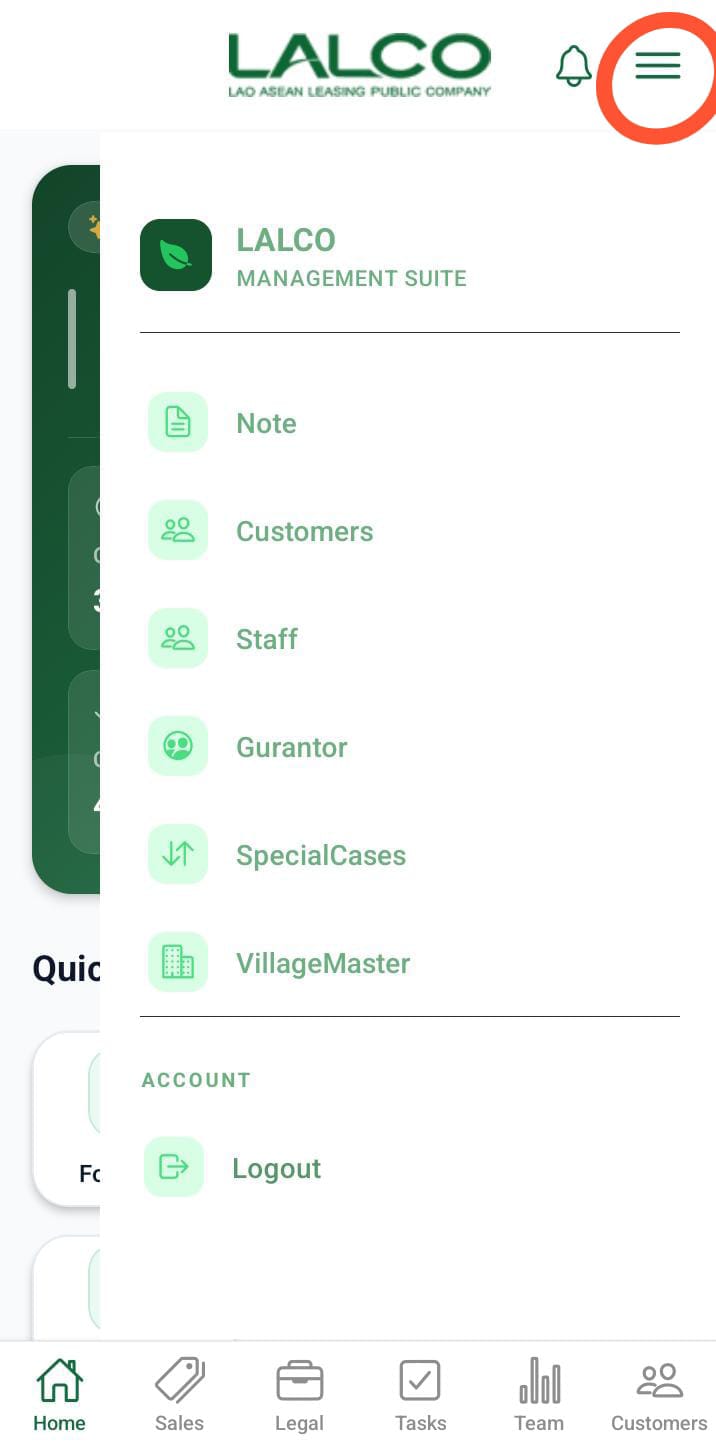
### 3.Menu Icon ☰

[![sideBar.png](http://wiki.lalco.la/uploads/images/gallery/2026-03/scaled-1680-/sidebar.png)](http://wiki.lalco.la/uploads/images/gallery/2026-03/sidebar.png)

###   


The **Menu icon** (☰), located at the top-right corner of the screen, opens the **side navigation panel**. This panel provides quick access to additional features and system functions.

When tapped, a sidebar appears with the following options:

---

#### Menu Options

- **GPS Offline**  
    Indicates the current GPS status. This helps agents know whether location tracking is active or not.
- **Log Call**  
    Quickly navigate to the call logging screen to record customer interactions.
- **Offer Loan**  
    Access the loan offering feature to create or manage loan proposals.
- **Locations**  
    View or manage location-related data (useful for field agents).
- **User**  
    Access user profile information and settings.
- **Capture**  
    Open the camera or capture feature to upload images or documents.
- **Add Note**  
    Create and save notes related to customers or tasks.
- **Customers**  
    Navigate to the customer management section.
- **Staff**  
    View or manage staff-related information.
- **Logout**  
    Securely log out of the application.

---

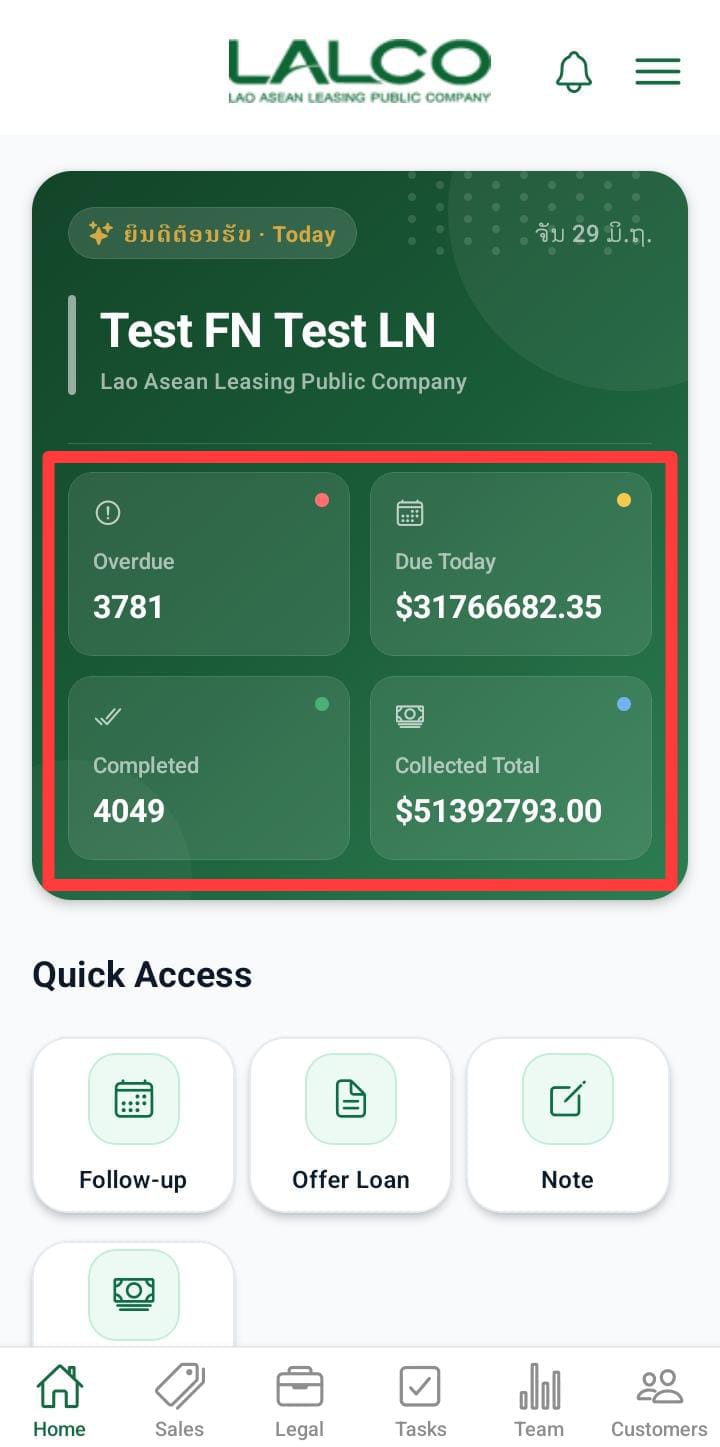
# Agent Overview Panel

[![badge.jpeg](http://wiki.lalco.la/uploads/images/gallery/2026-03/scaled-1680-/badge.jpeg)](http://wiki.lalco.la/uploads/images/gallery/2026-03/badge.jpeg)

This section shows a quick summary of the agent's daily activity.

### 4.FieldOps Badge

Indicates the user is operating in **Field Operations mode**.

---

### 5.Welcome Message

Displays the logged-in staff member’s role or name.

Example:

<div class="relative w-full mt-4 mb-1" id="bkmrk-welcome-back-agent"><div class=""><div class="relative"><div class="h-full min-h-0 min-w-0"><div class="h-full min-h-0 min-w-0"><div class="border border-token-border-light border-radius-3xl corner-superellipse/1.1 rounded-3xl"><div class="h-full w-full border-radius-3xl bg-token-bg-elevated-secondary corner-superellipse/1.1 overflow-clip rounded-3xl lxnfua_clipPathFallback"><div class="pe-11 pt-3"><div class="relative z-0 flex max-w-full"><div class="q9tKkq_viewer cm-editor z-10 light:cm-light dark:cm-light flex h-full w-full flex-col items-stretch ͼk ͼy" dir="ltr" id="bkmrk-welcome-back-agent-1"><div class="cm-scroller"><div class="cm-content q9tKkq_readonly">Welcome back Agent</div></div></div></div></div></div></div></div></div><div class=""><div class="">  
</div></div></div></div></div>---

### 6.Current Date

Shows the **current working date** for reference.

Example:

<div class="relative w-full mt-4 mb-1" id="bkmrk-mon%2C-mar-16"><div class=""><div class="relative"><div class="h-full min-h-0 min-w-0"><div class="h-full min-h-0 min-w-0"><div class="border border-token-border-light border-radius-3xl corner-superellipse/1.1 rounded-3xl"><div class="h-full w-full border-radius-3xl bg-token-bg-elevated-secondary corner-superellipse/1.1 overflow-clip rounded-3xl lxnfua_clipPathFallback"><div class="pe-11 pt-3"><div class="relative z-0 flex max-w-full"><div class="q9tKkq_viewer cm-editor z-10 light:cm-light dark:cm-light flex h-full w-full flex-col items-stretch ͼk ͼy" dir="ltr" id="bkmrk-mon%2C-mar-16-1"><div class="cm-scroller"><div class="cm-content q9tKkq_readonly">Mon, Mar 16</div></div></div></div></div></div></div></div></div><div class=""><div class="">  
</div></div></div></div></div><div class="relative w-full mt-4 mb-1" id="bkmrk--14"><div class=""><div class="relative"><div class=""><div class=""></div></div></div></div></div>---

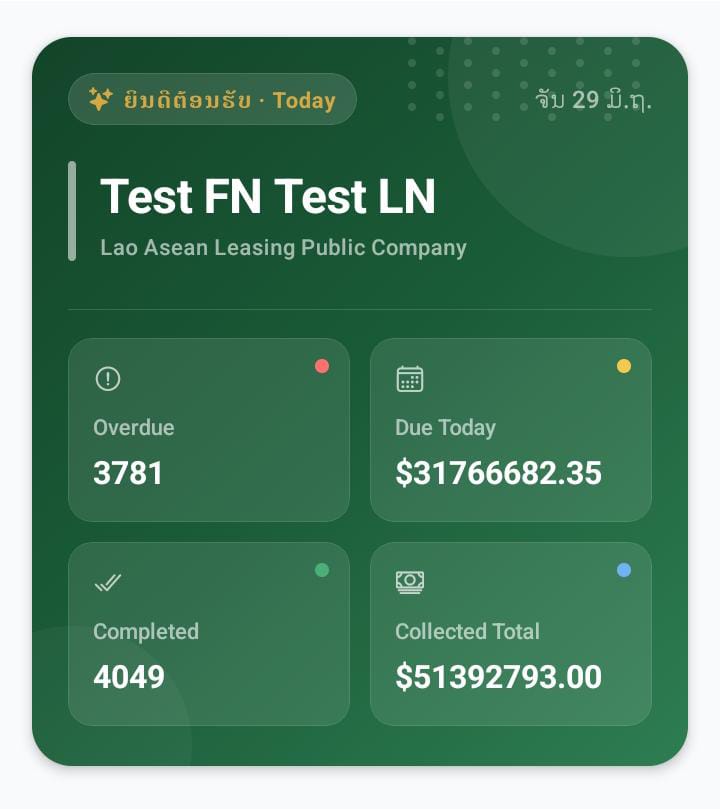
# Activity Summary Cards

[![card.jpeg](http://wiki.lalco.la/uploads/images/gallery/2026-03/scaled-1680-/card.jpeg)](http://wiki.lalco.la/uploads/images/gallery/2026-03/card.jpeg)

These cards show important performance indicators for the day.

### 7.Overdue

Displays the number of **customers with overdue payments**.

Example:

<div class="relative w-full mt-4 mb-1" id="bkmrk-4-overdue"><div class=""><div class="relative"><div class="h-full min-h-0 min-w-0"><div class="h-full min-h-0 min-w-0"><div class="border border-token-border-light border-radius-3xl corner-superellipse/1.1 rounded-3xl"><div class="h-full w-full border-radius-3xl bg-token-bg-elevated-secondary corner-superellipse/1.1 overflow-clip rounded-3xl lxnfua_clipPathFallback"><div class="pe-11 pt-3"><div class="relative z-0 flex max-w-full"><div class="q9tKkq_viewer cm-editor z-10 light:cm-light dark:cm-light flex h-full w-full flex-col items-stretch ͼk ͼy" dir="ltr" id="bkmrk-4-overdue-1"><div class="cm-scroller"><div class="cm-content q9tKkq_readonly">4 Overdue</div></div></div></div></div></div></div></div></div><div class=""><div class="">  
</div></div></div></div></div>This helps agents prioritize collections.

---

### 8.Due Today

Shows the **total amount that needs to be collected today**.

Example:

<div class="relative w-full mt-4 mb-1" id="bkmrk-%2435584.00"><div class=""><div class="relative"><div class="h-full min-h-0 min-w-0"><div class="h-full min-h-0 min-w-0"><div class="border border-token-border-light border-radius-3xl corner-superellipse/1.1 rounded-3xl"><div class="h-full w-full border-radius-3xl bg-token-bg-elevated-secondary corner-superellipse/1.1 overflow-clip rounded-3xl lxnfua_clipPathFallback"><div class="pe-11 pt-3"><div class="relative z-0 flex max-w-full"><div class="q9tKkq_viewer cm-editor z-10 light:cm-light dark:cm-light flex h-full w-full flex-col items-stretch ͼk ͼy" dir="ltr" id="bkmrk-%2435584.00-1"><div class="cm-scroller"><div class="cm-content q9tKkq_readonly">$35584.00</div></div></div></div></div></div></div></div></div><div class=""><div class="">  
</div></div></div></div></div>---

### 9.Completed

Displays the number of **completed tasks or collections for the day**.

Example:

<div class="relative w-full mt-4 mb-1" id="bkmrk-10-completed"><div class=""><div class="relative"><div class="h-full min-h-0 min-w-0"><div class="h-full min-h-0 min-w-0"><div class="border border-token-border-light border-radius-3xl corner-superellipse/1.1 rounded-3xl"><div class="h-full w-full border-radius-3xl bg-token-bg-elevated-secondary corner-superellipse/1.1 overflow-clip rounded-3xl lxnfua_clipPathFallback"><div class="pe-11 pt-3"><div class="relative z-0 flex max-w-full"><div class="q9tKkq_viewer cm-editor z-10 light:cm-light dark:cm-light flex h-full w-full flex-col items-stretch ͼk ͼy" dir="ltr" id="bkmrk-10-completed-1"><div class="cm-scroller"><div class="cm-content q9tKkq_readonly">0 Completed</div></div></div></div></div></div></div></div></div><div class=""><div class="">  
</div></div></div></div></div>---

### 10.Collected Today

Shows the **total amount successfully collected today**.

Example:

<div class="relative w-full mt-4 mb-1" id="bkmrk-%245358.00"><div class=""><div class="relative"><div class="h-full min-h-0 min-w-0"><div class="h-full min-h-0 min-w-0"><div class="border border-token-border-light border-radius-3xl corner-superellipse/1.1 rounded-3xl"><div class="h-full w-full border-radius-3xl bg-token-bg-elevated-secondary corner-superellipse/1.1 overflow-clip rounded-3xl lxnfua_clipPathFallback"><div class="pe-11 pt-3"><div class="relative z-0 flex max-w-full"><div class="q9tKkq_viewer cm-editor z-10 light:cm-light dark:cm-light flex h-full w-full flex-col items-stretch ͼk ͼy" dir="ltr" id="bkmrk-%245358.00-1"><div class="cm-scroller"><div class="cm-content q9tKkq_readonly">$5358.00</div></div></div></div></div></div></div></div></div><div class=""><div class="">  
</div></div></div></div></div>---

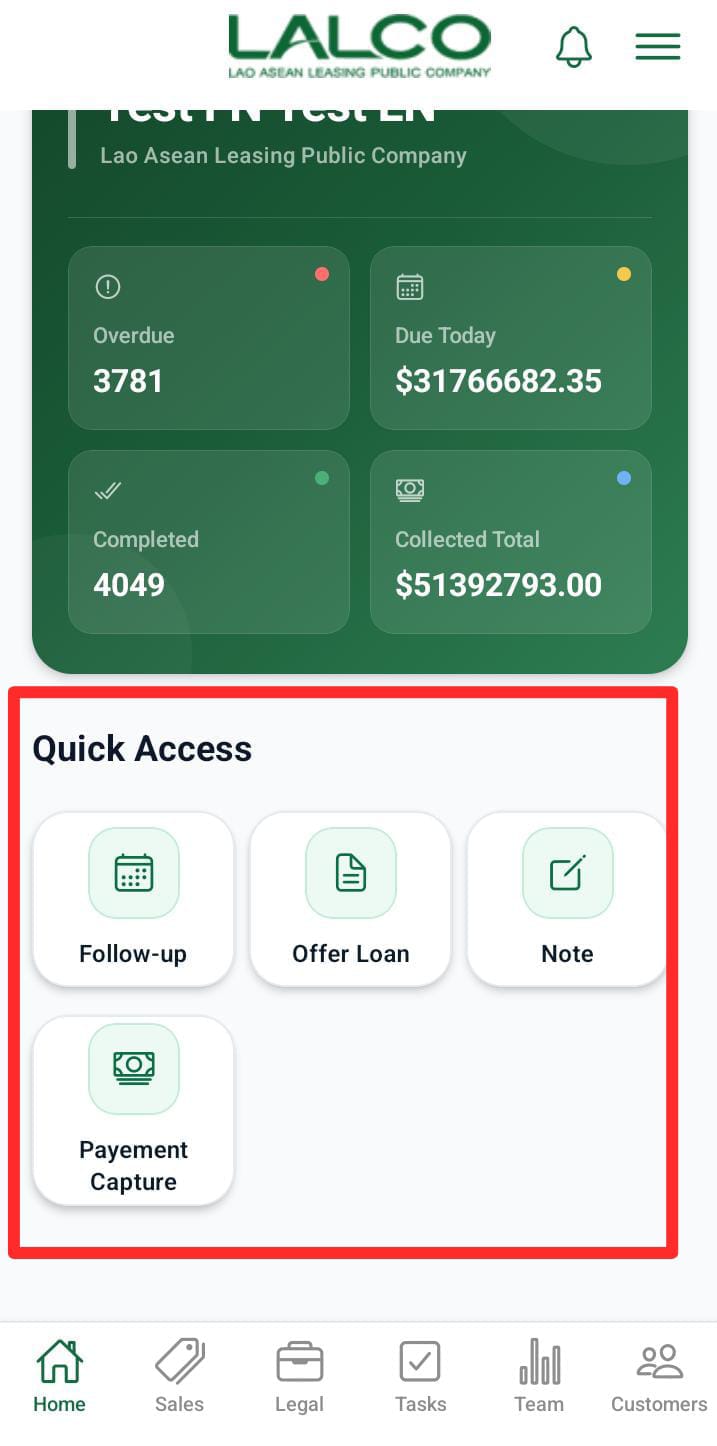
# Quick Access Section

[![QA.jpeg](http://wiki.lalco.la/uploads/images/gallery/2026-03/scaled-1680-/qa.jpeg)](http://wiki.lalco.la/uploads/images/gallery/2026-03/qa.jpeg)

The **Quick Access** panel provides shortcuts to frequently used actions.

---

### 11.Log Call

Allows agents to record details after contacting a customer.

Information that can be logged:

- Call result
- Customer response
- Payment commitment

---

### 12.Follow-up

Used to schedule a **future reminder to contact a customer again**.

Agents can set:

- Follow-up date
- Follow-up notes

---

### 13.Offer Loan

Allows staff to create or propose **new loan offers to customers**.

This is typically used when:

- A customer requests a loan
- A new sales opportunity is identified

---

### 14.Reassign Tasks

Allows agents or supervisors to **transfer tasks to another staff member**.

Used when:

- The assigned agent is unavailable
- Tasks need redistribution

---

### 15.Add Note

Agents can record **internal notes about customers or cases**.

Notes may include:

- Customer discussions
- Payment promises
- Special instructions

---

# Bottom Navigation Menu

[![bnav.jpeg](http://wiki.lalco.la/uploads/images/gallery/2026-03/scaled-1680-/bnav.jpeg)](http://wiki.lalco.la/uploads/images/gallery/2026-03/bnav.jpeg)
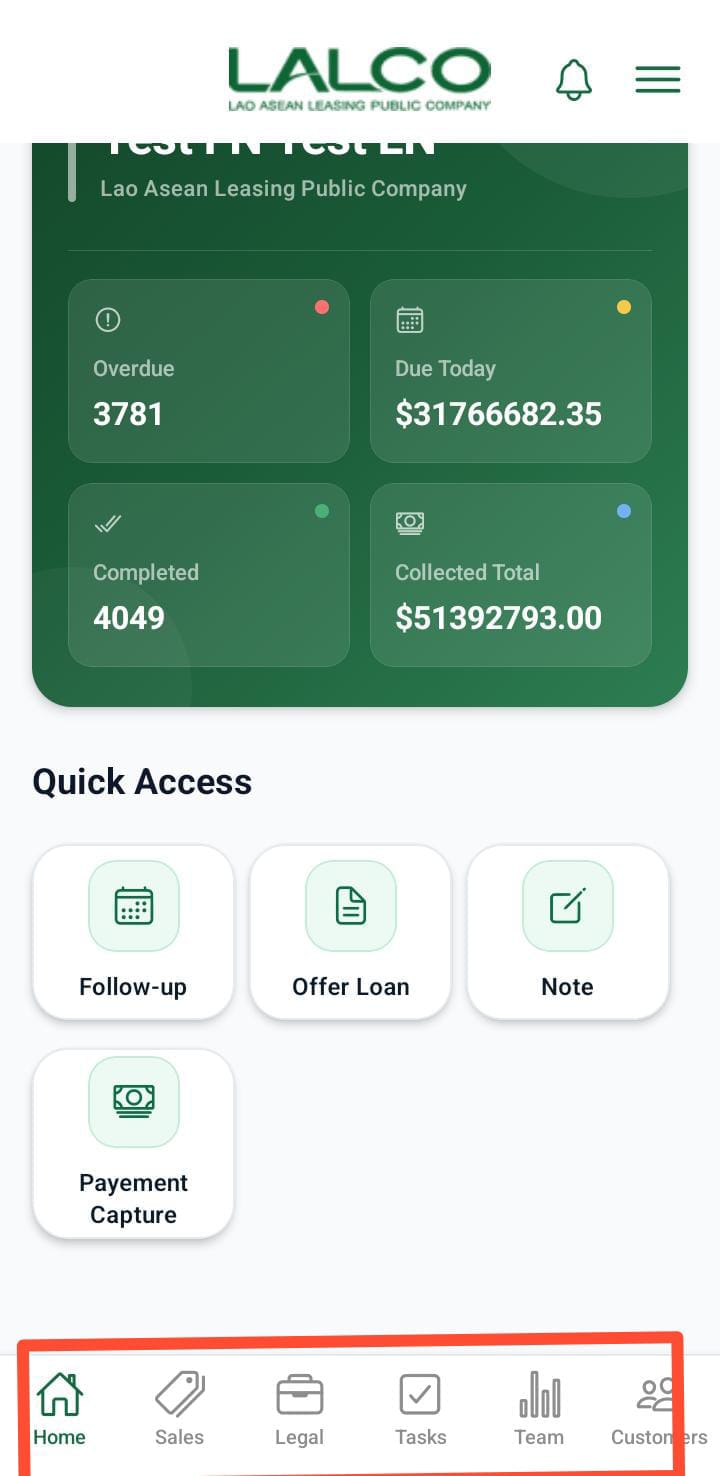
The bottom navigation bar allows users to move between main sections of the application.

### 16.Home

Returns to the **Dashboard screen**.

---

### 17.Tasks

Shows all assigned **tasks and pending activities**.

---

### 18.Sales

Used to manage **loan sales and offers**.

---

### 19.Legal

Displays cases that require **legal action or documentation**.

---

### 20.Team

Shows team members and allows **team coordination**.

---

### 21.Customers

Provides access to the **customer database**.

Agents can:

- Search customers
- View loan details
- Update records