# Location Screen

#   


[![7ea08014-d50b-42ba-9599-4fd9f2308a73.jpg](http://wiki.lalco.la/uploads/images/gallery/2026-03/scaled-1680-/7ea08014-d50b-42ba-9599-4fd9f2308a73.jpg)](http://wiki.lalco.la/uploads/images/gallery/2026-03/7ea08014-d50b-42ba-9599-4fd9f2308a73.jpg)
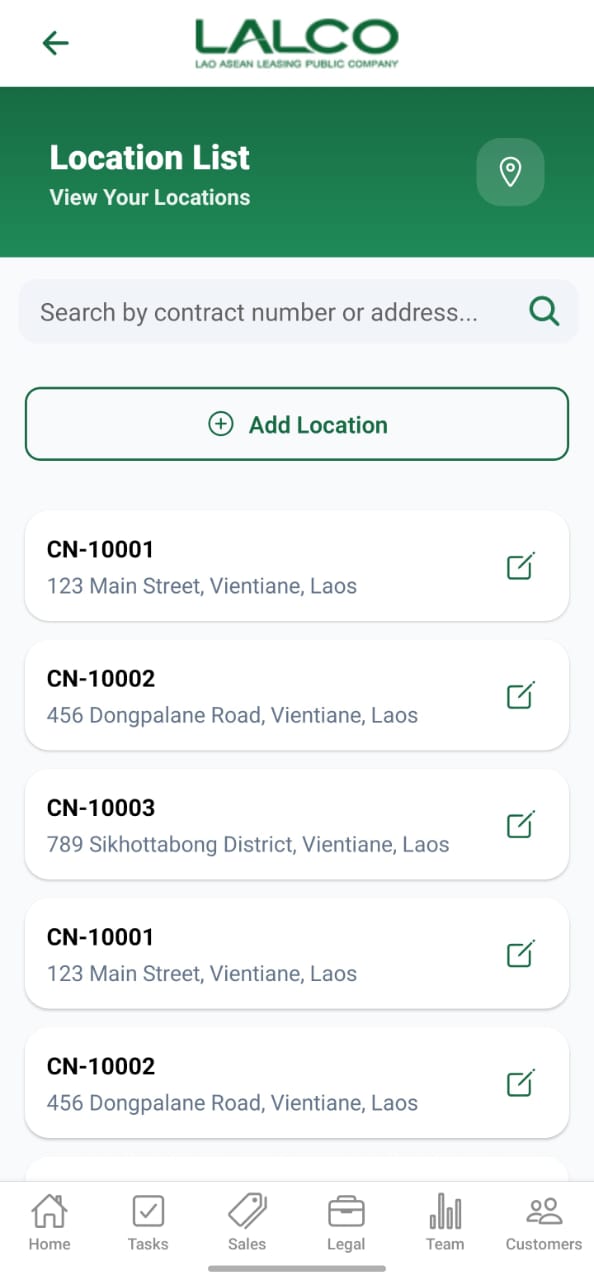
The **Location Screen** allows staff to view and manage collection locations linked to contracts. Users can search, add, and update location details.

---

# Search Function

### Search Bar

<div class="relative w-full mt-4 mb-1" id="bkmrk-search-by-contract-n"><div class=""><div class="relative"><div class="h-full min-h-0 min-w-0"><div class="h-full min-h-0 min-w-0"><div class="border border-token-border-light border-radius-3xl corner-superellipse/1.1 rounded-3xl"><div class="h-full w-full border-radius-3xl bg-token-bg-elevated-secondary corner-superellipse/1.1 overflow-clip rounded-3xl lxnfua_clipPathFallback"><div class="pe-11 pt-3"><div class="relative z-0 flex max-w-full"><div class="q9tKkq_viewer cm-editor z-10 light:cm-light dark:cm-light flex h-full w-full flex-col items-stretch ͼ5 ͼj" dir="ltr" id="bkmrk-search-by-contract-n-1"><div class="cm-scroller"><div class="cm-content q9tKkq_readonly">Search by contract number or address...</div></div></div></div></div></div></div></div></div><div class=""><div class="">  
</div></div></div></div></div>Allows users to search by:

- Contract number
- Address

---

# Main Action

### Add Location

Button used to create a new collection location.

---

# Location List

Each item represents a saved location.

### Example:

<div class="relative w-full mt-4 mb-1" id="bkmrk-cn-10001-123-main-st"><div class=""><div class="relative"><div class="h-full min-h-0 min-w-0"><div class="h-full min-h-0 min-w-0"><div class="border border-token-border-light border-radius-3xl corner-superellipse/1.1 rounded-3xl"><div class="h-full w-full border-radius-3xl bg-token-bg-elevated-secondary corner-superellipse/1.1 overflow-clip rounded-3xl lxnfua_clipPathFallback"><div class="pe-11 pt-3"><div class="relative z-0 flex max-w-full"><div class="q9tKkq_viewer cm-editor z-10 light:cm-light dark:cm-light flex h-full w-full flex-col items-stretch ͼ5 ͼj" dir="ltr" id="bkmrk-cn-10001-123-main-st-1"><div class="cm-scroller"><div class="cm-content q9tKkq_readonly">CN-10001   
123 Main Street, Vientiane, Laos</div></div></div></div></div></div></div></div></div><div class=""><div class="">  
</div></div></div></div></div>---

### Information Displayed

Each record shows:

- **Contract Number**
- **Address**

---

# How to Use

### View Locations

1. Open the **Location screen**
2. Browse or search locations
3. Tap edit icon to modify

---

---

# Add Location Screen

[![cf10034e-f3a9-4c1c-a697-0ba5330c80f8.jpg](http://wiki.lalco.la/uploads/images/gallery/2026-03/scaled-1680-/cf10034e-f3a9-4c1c-a697-0ba5330c80f8.jpg)](http://wiki.lalco.la/uploads/images/gallery/2026-03/cf10034e-f3a9-4c1c-a697-0ba5330c80f8.jpg)
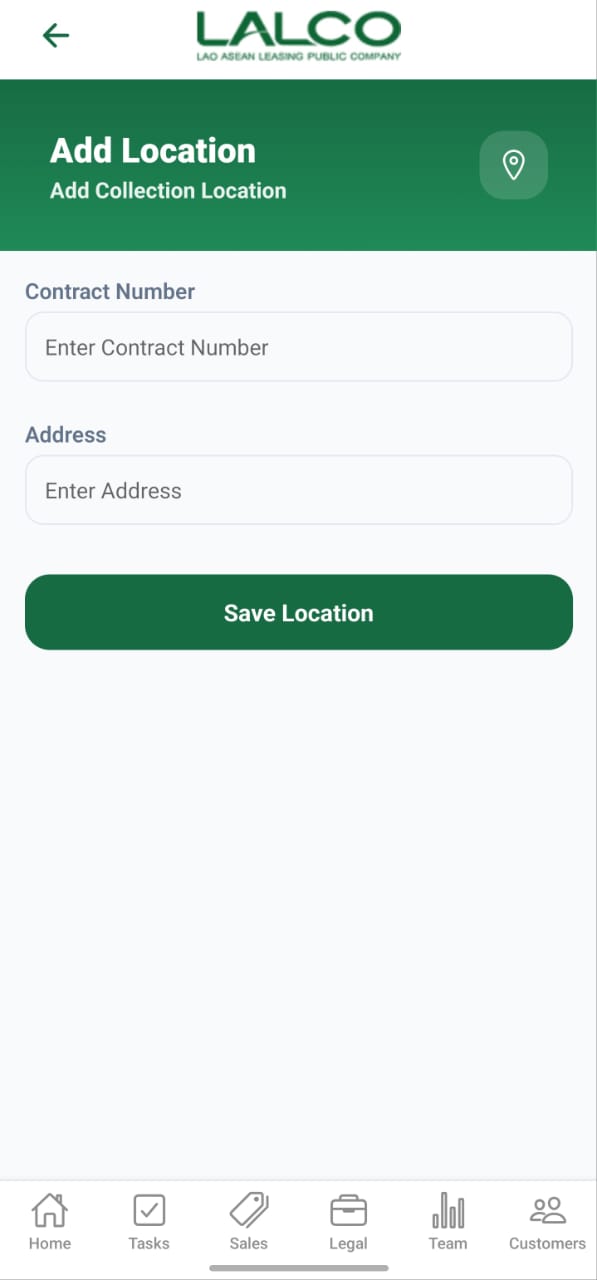
The **Add Location Screen** allows staff to create or update a collection location for a contract.

---

# Form Fields

### Contract Number

Enter or select the contract number

Example:

<div class="relative w-full mt-4 mb-1" id="bkmrk-cn-10001"><div class=""><div class="relative"><div class="h-full min-h-0 min-w-0"><div class="h-full min-h-0 min-w-0"><div class="border border-token-border-light border-radius-3xl corner-superellipse/1.1 rounded-3xl"><div class="h-full w-full border-radius-3xl bg-token-bg-elevated-secondary corner-superellipse/1.1 overflow-clip rounded-3xl lxnfua_clipPathFallback"><div class="pe-11 pt-3"><div class="relative z-0 flex max-w-full"><div class="q9tKkq_viewer cm-editor z-10 light:cm-light dark:cm-light flex h-full w-full flex-col items-stretch ͼ5 ͼj" dir="ltr" id="bkmrk-cn-10001-1"><div class="cm-scroller"><div class="cm-content q9tKkq_readonly">CN-10001</div></div></div></div></div></div></div></div></div><div class=""><div class="">  
</div></div></div></div></div>---

### Address

Enter the full collection address

Example:

<div class="relative w-full mt-4 mb-1" id="bkmrk-123-main-street%2C-vie"><div class=""><div class="relative"><div class="h-full min-h-0 min-w-0"><div class="h-full min-h-0 min-w-0"><div class="border border-token-border-light border-radius-3xl corner-superellipse/1.1 rounded-3xl"><div class="h-full w-full border-radius-3xl bg-token-bg-elevated-secondary corner-superellipse/1.1 overflow-clip rounded-3xl lxnfua_clipPathFallback"><div class="pe-11 pt-3"><div class="relative z-0 flex max-w-full"><div class="q9tKkq_viewer cm-editor z-10 light:cm-light dark:cm-light flex h-full w-full flex-col items-stretch ͼ5 ͼj" dir="ltr" id="bkmrk-123-main-street%2C-vie-1"><div class="cm-scroller"><div class="cm-content q9tKkq_readonly">123 Main Street, Vientiane, Laos</div></div></div></div></div></div></div></div></div><div class=""><div class="">  
</div></div></div></div></div>---

# Action

### Save Location

Saves the location details to the system

---

# How to Use

### Add Location

1. Tap **Add Location**
2. Enter contract number
3. Enter address
4. Tap **Save Location**

---

### Edit Location

[![3491d9fe-e61f-441e-8f41-059b50eeb283.jpg](http://wiki.lalco.la/uploads/images/gallery/2026-03/scaled-1680-/3491d9fe-e61f-441e-8f41-059b50eeb283.jpg)](http://wiki.lalco.la/uploads/images/gallery/2026-03/3491d9fe-e61f-441e-8f41-059b50eeb283.jpg)
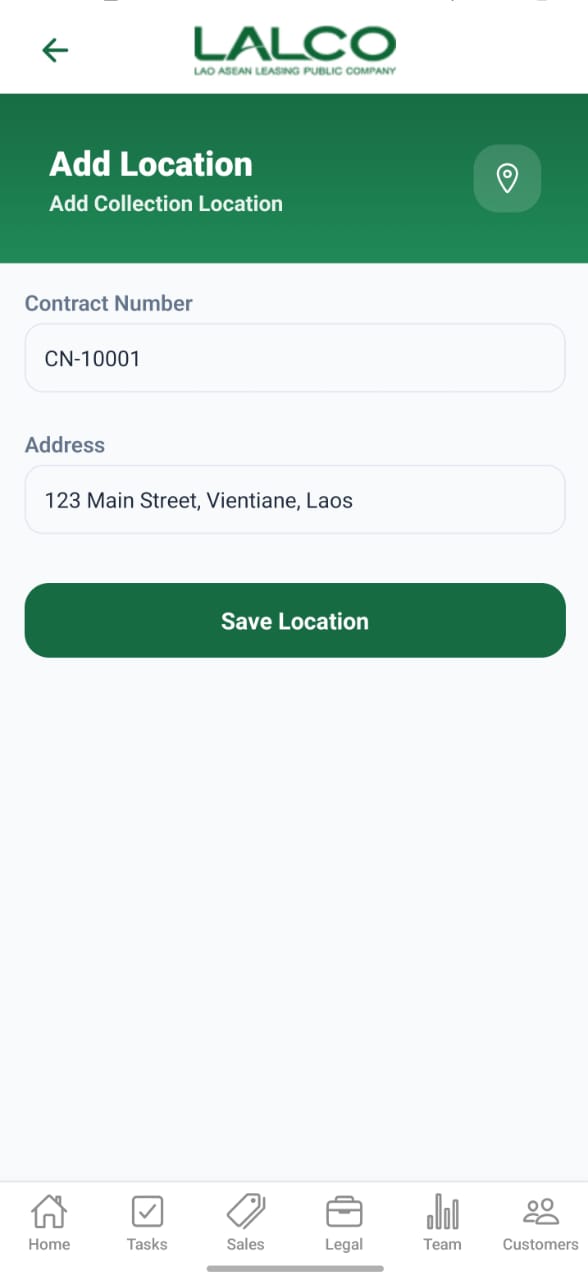
1. Tap edit icon from list
2. Update details
3. Tap **Save Location**

---

# Navigation

<div class="relative w-full mt-4 mb-1" id="bkmrk-location-list-%E2%86%92-add-"><div class=""><div class="relative"><div class="h-full min-h-0 min-w-0"><div class="h-full min-h-0 min-w-0"><div class="border border-token-border-light border-radius-3xl corner-superellipse/1.1 rounded-3xl"><div class="h-full w-full border-radius-3xl bg-token-bg-elevated-secondary corner-superellipse/1.1 overflow-clip rounded-3xl lxnfua_clipPathFallback"><div class="pe-11 pt-3"><div class="relative z-0 flex max-w-full"><div class="q9tKkq_viewer cm-editor z-10 light:cm-light dark:cm-light flex h-full w-full flex-col items-stretch ͼ5 ͼj" dir="ltr" id="bkmrk-location-list-%E2%86%92-add--1"><div class="cm-scroller"><div class="cm-content q9tKkq_readonly">Location List → Add Location / Edit Location</div></div></div></div></div></div></div></div></div></div></div></div>