# Note Details Screen

[![4f005548-c4a3-414a-8dcc-07c0924ca8aa.jpg](http://wiki.lalco.la/uploads/images/gallery/2026-03/scaled-1680-/4f005548-c4a3-414a-8dcc-07c0924ca8aa.jpg)](http://wiki.lalco.la/uploads/images/gallery/2026-03/4f005548-c4a3-414a-8dcc-07c0924ca8aa.jpg)

## Overview

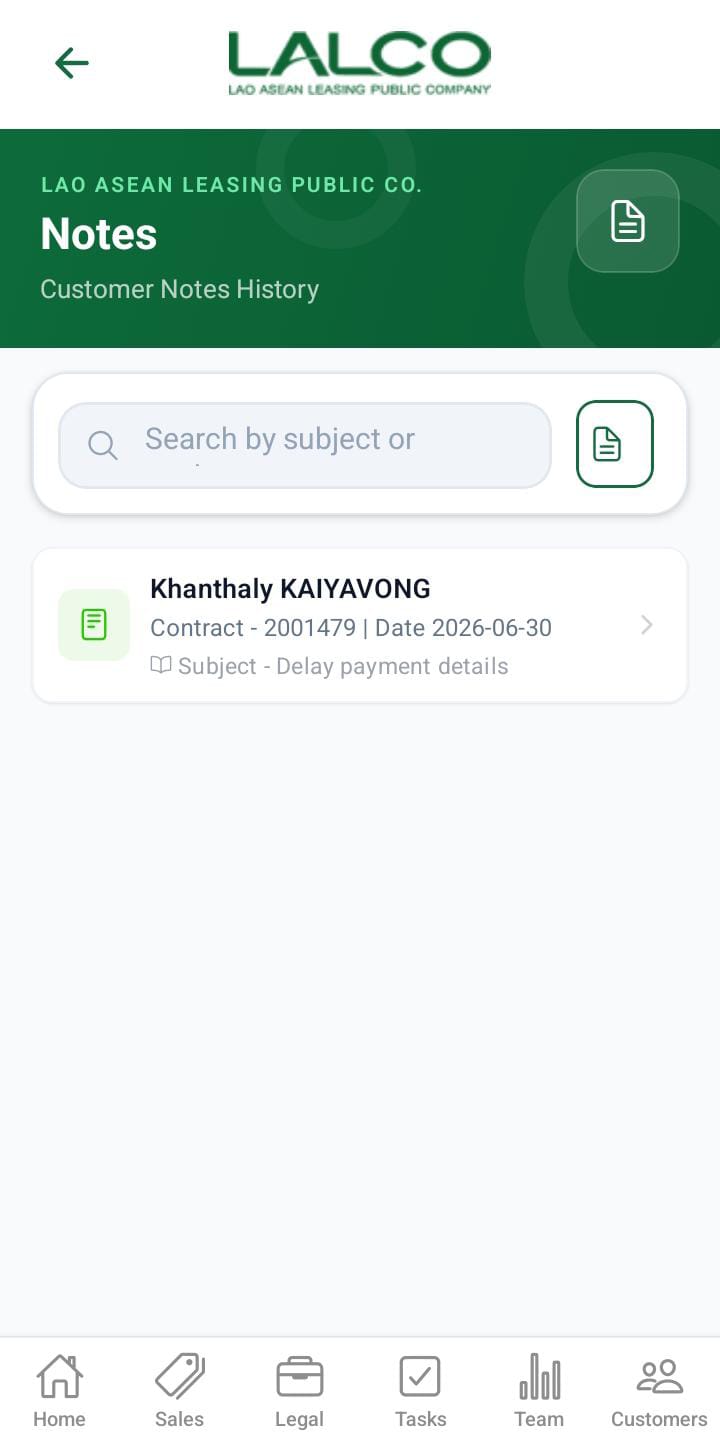
The **Note Details Screen** allows staff to create and save notes related to customers, contracts, and follow-ups. It helps track important interactions and maintain proper records.

---

# Access Path

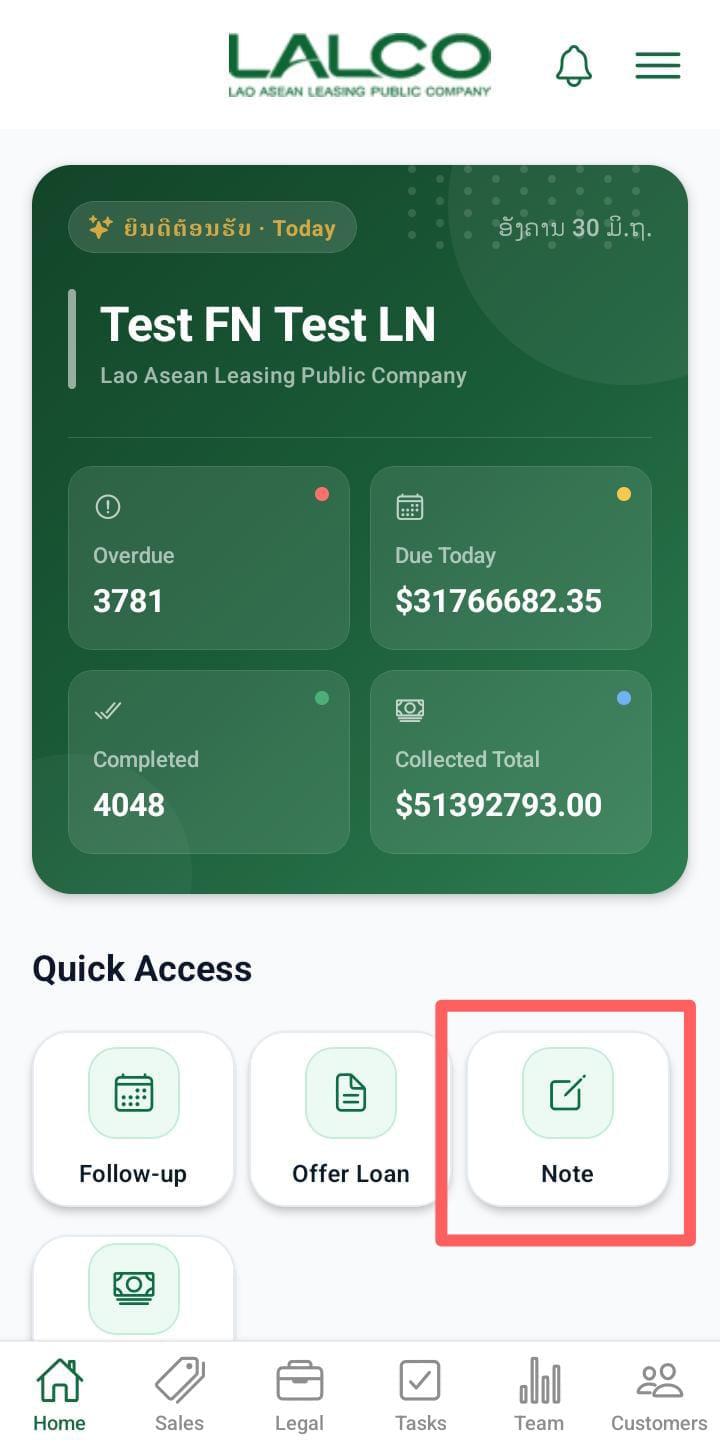
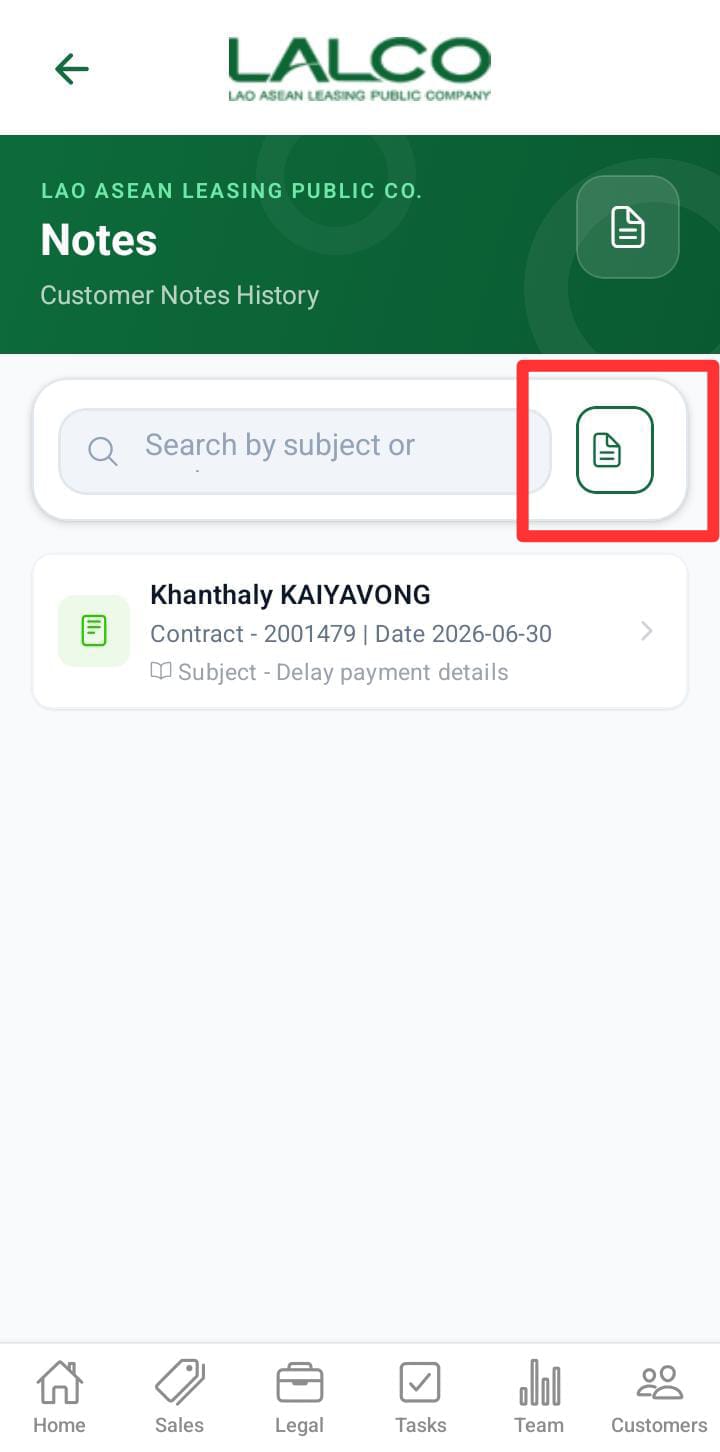
<div class="relative w-full mt-4 mb-1" id="bkmrk-home%E2%86%92-add-note"><div class=""><div class="relative"><div class="h-full min-h-0 min-w-0"><div class="h-full min-h-0 min-w-0"><div class="border border-token-border-light border-radius-3xl corner-superellipse/1.1 rounded-3xl"><div class="h-full w-full border-radius-3xl bg-token-bg-elevated-secondary corner-superellipse/1.1 overflow-clip rounded-3xl lxnfua_clipPathFallback"><div class="pe-11 pt-3"><div class="relative z-0 flex max-w-full"><div class="q9tKkq_viewer cm-editor z-10 light:cm-light dark:cm-light flex h-full w-full flex-col items-stretch ͼ1c ͼ1q" dir="ltr" id="bkmrk-home%E2%86%92-add-note-1"><div class="cm-scroller"><div class="cm-content q9tKkq_readonly">Home→ Add Note</div></div></div></div></div></div></div></div></div><div class=""><div class="">  
</div></div></div></div></div>---

# Note Details Form

## Overview

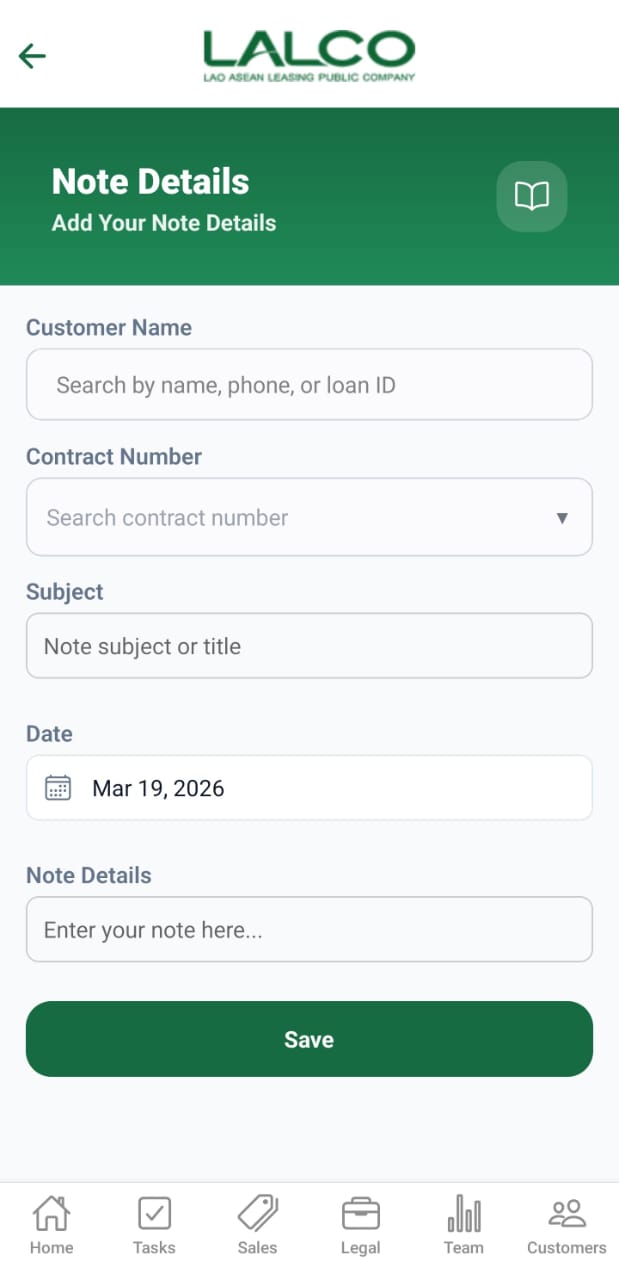
Provides input fields to create a new note linked to a customer and contract.

---

# Header Section

### Page Title

**Note Details**

---

### Description

<div class="relative w-full mt-4 mb-1" id="bkmrk-add-your-note-detail"><div class=""><div class="relative"><div class="h-full min-h-0 min-w-0"><div class="h-full min-h-0 min-w-0"><div class="border border-token-border-light border-radius-3xl corner-superellipse/1.1 rounded-3xl"><div class="h-full w-full border-radius-3xl bg-token-bg-elevated-secondary corner-superellipse/1.1 overflow-clip rounded-3xl lxnfua_clipPathFallback"><div class="pe-11 pt-3"><div class="relative z-0 flex max-w-full"><div class="q9tKkq_viewer cm-editor z-10 light:cm-light dark:cm-light flex h-full w-full flex-col items-stretch ͼ1c ͼ1q" dir="ltr" id="bkmrk-add-your-note-detail-1"><div class="cm-scroller"><div class="cm-content q9tKkq_readonly">Add your note details</div></div></div></div></div></div></div></div></div><div class=""><div class="">  
</div></div></div></div></div>---

### Book Icon 📖

- Represents note/document management

---

# Input Fields

### 1. Customer Name

<div class="relative w-full mt-4 mb-1" id="bkmrk-search-by-name%2C-phon"><div class=""><div class="relative"><div class="h-full min-h-0 min-w-0"><div class="h-full min-h-0 min-w-0"><div class="border border-token-border-light border-radius-3xl corner-superellipse/1.1 rounded-3xl"><div class="h-full w-full border-radius-3xl bg-token-bg-elevated-secondary corner-superellipse/1.1 overflow-clip rounded-3xl lxnfua_clipPathFallback"><div class="pe-11 pt-3"><div class="relative z-0 flex max-w-full"><div class="q9tKkq_viewer cm-editor z-10 light:cm-light dark:cm-light flex h-full w-full flex-col items-stretch ͼ1c ͼ1q" dir="ltr" id="bkmrk-search-by-name%2C-phon-1"><div class="cm-scroller"><div class="cm-content q9tKkq_readonly">Search by name, phone, or loan ID</div></div></div></div></div></div></div></div></div><div class=""><div class="">  
</div></div></div></div></div>- Search and select a customer
- Supports:
    
    
    - Customer name
    - Phone number
    - Loan ID

---

### 2. Contract Number

<div class="relative w-full mt-4 mb-1" id="bkmrk-search-contract-numb"><div class=""><div class="relative"><div class="h-full min-h-0 min-w-0"><div class="h-full min-h-0 min-w-0"><div class="border border-token-border-light border-radius-3xl corner-superellipse/1.1 rounded-3xl"><div class="h-full w-full border-radius-3xl bg-token-bg-elevated-secondary corner-superellipse/1.1 overflow-clip rounded-3xl lxnfua_clipPathFallback"><div class="pe-11 pt-3"><div class="relative z-0 flex max-w-full"><div class="q9tKkq_viewer cm-editor z-10 light:cm-light dark:cm-light flex h-full w-full flex-col items-stretch ͼ1c ͼ1q" dir="ltr" id="bkmrk-search-contract-numb-1"><div class="cm-scroller"><div class="cm-content q9tKkq_readonly">Search contract number</div></div></div></div></div></div></div></div></div><div class=""><div class="">  
</div></div></div></div></div>- Dropdown or searchable field
- Links note to a specific contract

---

### 3. Subject

<div class="relative w-full mt-4 mb-1" id="bkmrk-note-subject-or-titl"><div class=""><div class="relative"><div class="h-full min-h-0 min-w-0"><div class="h-full min-h-0 min-w-0"><div class="border border-token-border-light border-radius-3xl corner-superellipse/1.1 rounded-3xl"><div class="h-full w-full border-radius-3xl bg-token-bg-elevated-secondary corner-superellipse/1.1 overflow-clip rounded-3xl lxnfua_clipPathFallback"><div class="pe-11 pt-3"><div class="relative z-0 flex max-w-full"><div class="q9tKkq_viewer cm-editor z-10 light:cm-light dark:cm-light flex h-full w-full flex-col items-stretch ͼ1c ͼ1q" dir="ltr" id="bkmrk-note-subject-or-titl-1"><div class="cm-scroller"><div class="cm-content q9tKkq_readonly">Note subject or title</div></div></div></div></div></div></div></div></div><div class=""><div class="">  
</div></div></div></div></div>- Short title describing the note

---

### 4. Date

<div class="relative w-full mt-4 mb-1" id="bkmrk-mar-19%2C-2026"><div class=""><div class="relative"><div class="h-full min-h-0 min-w-0"><div class="h-full min-h-0 min-w-0"><div class="border border-token-border-light border-radius-3xl corner-superellipse/1.1 rounded-3xl"><div class="h-full w-full border-radius-3xl bg-token-bg-elevated-secondary corner-superellipse/1.1 overflow-clip rounded-3xl lxnfua_clipPathFallback"><div class="pe-11 pt-3"><div class="relative z-0 flex max-w-full"><div class="q9tKkq_viewer cm-editor z-10 light:cm-light dark:cm-light flex h-full w-full flex-col items-stretch ͼ1c ͼ1q" dir="ltr" id="bkmrk-mar-19%2C-2026-1"><div class="cm-scroller"><div class="cm-content q9tKkq_readonly">Mar 19, 2026</div></div></div></div></div></div></div></div></div><div class=""><div class="">  
</div></div></div></div></div>- Default is current date
- May be editable

---

### 5. Note Details

<div class="relative w-full mt-4 mb-1" id="bkmrk-enter-your-note-here"><div class=""><div class="relative"><div class="h-full min-h-0 min-w-0"><div class="h-full min-h-0 min-w-0"><div class="border border-token-border-light border-radius-3xl corner-superellipse/1.1 rounded-3xl"><div class="h-full w-full border-radius-3xl bg-token-bg-elevated-secondary corner-superellipse/1.1 overflow-clip rounded-3xl lxnfua_clipPathFallback"><div class="pe-11 pt-3"><div class="relative z-0 flex max-w-full"><div class="q9tKkq_viewer cm-editor z-10 light:cm-light dark:cm-light flex h-full w-full flex-col items-stretch ͼ1c ͼ1q" dir="ltr" id="bkmrk-enter-your-note-here-1"><div class="cm-scroller"><div class="cm-content q9tKkq_readonly">Enter your note here...</div></div></div></div></div></div></div></div></div><div class=""><div class="">  
</div></div></div></div></div>- Main content of the note
- Used for:
    
    
    - Call summaries
    - Customer updates
    - Follow-up actions

---

# Action Button

### Save Button

- Label: **Save**
- Function:
    
    
    - Stores the note
    - Links it to selected customer and contract

---

# How to Use

### Create a Note

1. Open **Note Details**
2. Search and select a **Customer**
3. Select **Contract Number**
4. Enter a **Subject**
5. Verify or update the **Date**
6. Enter detailed information in **Note Details**
7. Tap **Save**

---

# Validation Rules (Recommended)

- Customer selection is **required**
- Contract number is **required**
- Subject should not be empty
- Note details must contain meaningful content

---

# Success State

<div class="relative w-full mt-4 mb-1" id="bkmrk-note-saved-successfu"><div class=""><div class="relative"><div class="h-full min-h-0 min-w-0"><div class="h-full min-h-0 min-w-0"><div class="border border-token-border-light border-radius-3xl corner-superellipse/1.1 rounded-3xl"><div class="h-full w-full border-radius-3xl bg-token-bg-elevated-secondary corner-superellipse/1.1 overflow-clip rounded-3xl lxnfua_clipPathFallback"><div class="pe-11 pt-3"><div class="relative z-0 flex max-w-full"><div class="q9tKkq_viewer cm-editor z-10 light:cm-light dark:cm-light flex h-full w-full flex-col items-stretch ͼ1c ͼ1q" dir="ltr" id="bkmrk-note-saved-successfu-1"><div class="cm-scroller"><div class="cm-content q9tKkq_readonly">Note saved successfully</div></div></div></div></div></div></div></div></div><div class=""><div class="">  
</div></div></div></div></div>---

# Error States

<div class="relative w-full mt-4 mb-1" id="bkmrk-please-fill-all-requ"><div class=""><div class="relative"><div class="h-full min-h-0 min-w-0"><div class="h-full min-h-0 min-w-0"><div class="border border-token-border-light border-radius-3xl corner-superellipse/1.1 rounded-3xl"><div class="h-full w-full border-radius-3xl bg-token-bg-elevated-secondary corner-superellipse/1.1 overflow-clip rounded-3xl lxnfua_clipPathFallback"><div class="pe-11 pt-3"><div class="relative z-0 flex max-w-full"><div class="q9tKkq_viewer cm-editor z-10 light:cm-light dark:cm-light flex h-full w-full flex-col items-stretch ͼ1c ͼ1q" dir="ltr" id="bkmrk-please-fill-all-requ-1"><div class="cm-scroller"><div class="cm-content q9tKkq_readonly">Please fill all required fields</div></div></div></div></div></div></div></div></div><div class=""><div class="">  
</div></div></div></div></div><div class="relative w-full mt-4 mb-1" id="bkmrk-failed-to-save-note."><div class=""><div class="relative"><div class="h-full min-h-0 min-w-0"><div class="h-full min-h-0 min-w-0"><div class="border border-token-border-light border-radius-3xl corner-superellipse/1.1 rounded-3xl"><div class="h-full w-full border-radius-3xl bg-token-bg-elevated-secondary corner-superellipse/1.1 overflow-clip rounded-3xl lxnfua_clipPathFallback"><div class="pe-11 pt-3"><div class="relative z-0 flex max-w-full"><div class="q9tKkq_viewer cm-editor z-10 light:cm-light dark:cm-light flex h-full w-full flex-col items-stretch ͼ1c ͼ1q" dir="ltr" id="bkmrk-failed-to-save-note.-1"><div class="cm-scroller"><div class="cm-content q9tKkq_readonly">Failed to save note. Try again</div></div></div></div></div></div></div></div></div><div class=""><div class="">  
</div></div></div></div></div>---

💡 **Tip:**  
Use notes immediately after calls or customer visits to ensure **accurate tracking and better follow-up management**.