# Reassigned Tasks Screen

# Reassigned Tasks Screen

## [![966f5dc9-997f-4fcc-bfdc-3f6870aea7ea.jpg](http://wiki.lalco.la/uploads/images/gallery/2026-03/scaled-1680-/966f5dc9-997f-4fcc-bfdc-3f6870aea7ea.jpg)](http://wiki.lalco.la/uploads/images/gallery/2026-03/966f5dc9-997f-4fcc-bfdc-3f6870aea7ea.jpg)
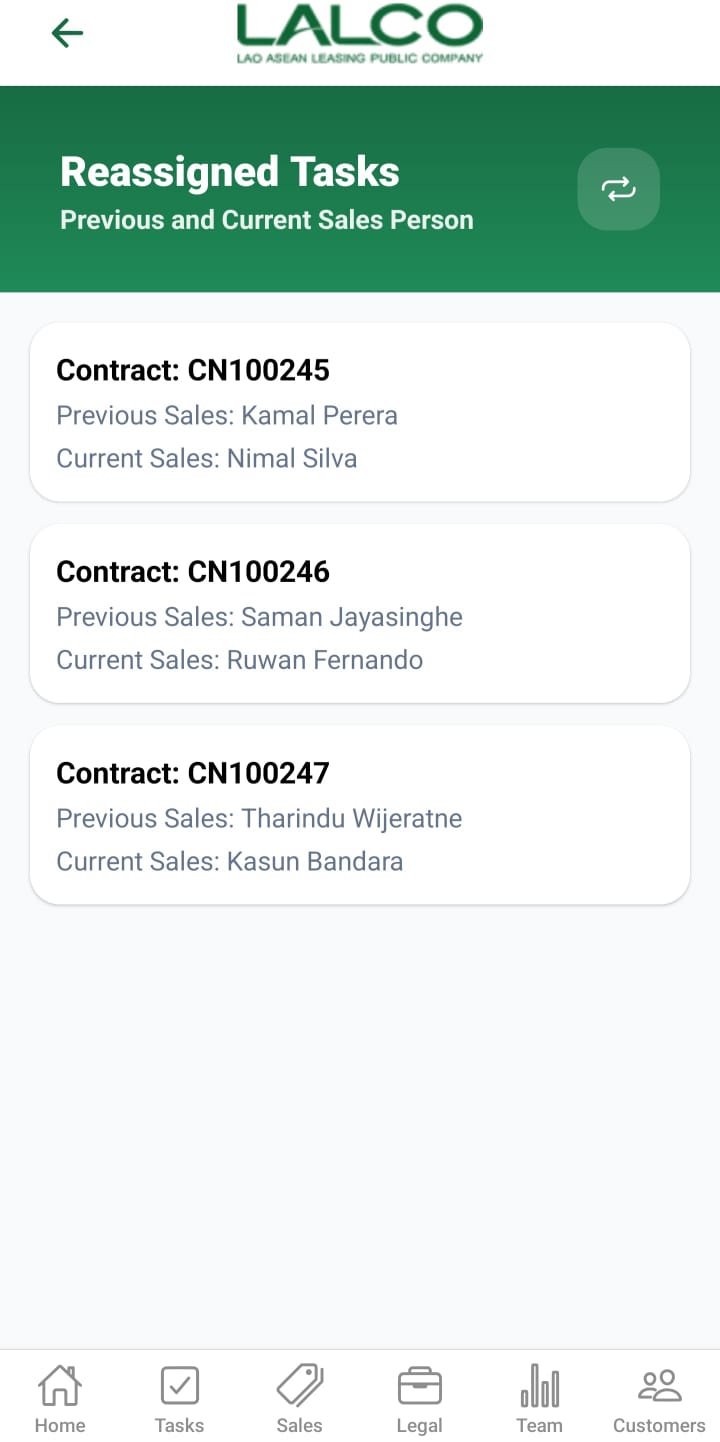
The **Reassigned Tasks Screen** allows users to view tasks that have been reassigned between sales staff. It shows both previous and current sales persons for each contract.

---

# Task List

Each item represents a reassigned task.

### Example:

<div class="relative w-full mt-4 mb-1" id="bkmrk-contract%3A-cn100245-p"><div class=""><div class="relative"><div class="h-full min-h-0 min-w-0"><div class="h-full min-h-0 min-w-0"><div class="border border-token-border-light border-radius-3xl corner-superellipse/1.1 rounded-3xl"><div class="h-full w-full border-radius-3xl bg-token-bg-elevated-secondary corner-superellipse/1.1 overflow-clip rounded-3xl lxnfua_clipPathFallback"><div class="pe-11 pt-3"><div class="relative z-0 flex max-w-full"><div class="q9tKkq_viewer cm-editor z-10 light:cm-light dark:cm-light flex h-full w-full flex-col items-stretch ͼk ͼy" dir="ltr" id="bkmrk-contract%3A-cn100245-p-1"><div class="cm-scroller"><div class="cm-content q9tKkq_readonly">Contract: CN100245   
Previous Sales: Kamal Perera   
Current Sales: Nimal Silva</div></div></div></div></div></div></div></div></div><div class=""><div class="">  
</div></div></div></div></div>---

### Information Displayed

Each record shows:

- **Contract Number**
- **Previous Sales Person**
- **Current Sales Person**

---

# How to Use

### View Reassigned Tasks

1. Open the **Reassigned Tasks section**
2. Browse the list of tasks
3. Tap a task to view more details

---

---

# Reassign Task Details Screen

[![25d52260-6c40-477b-9097-0ebcce600367.jpg](http://wiki.lalco.la/uploads/images/gallery/2026-03/scaled-1680-/25d52260-6c40-477b-9097-0ebcce600367.jpg)](http://wiki.lalco.la/uploads/images/gallery/2026-03/25d52260-6c40-477b-9097-0ebcce600367.jpg)
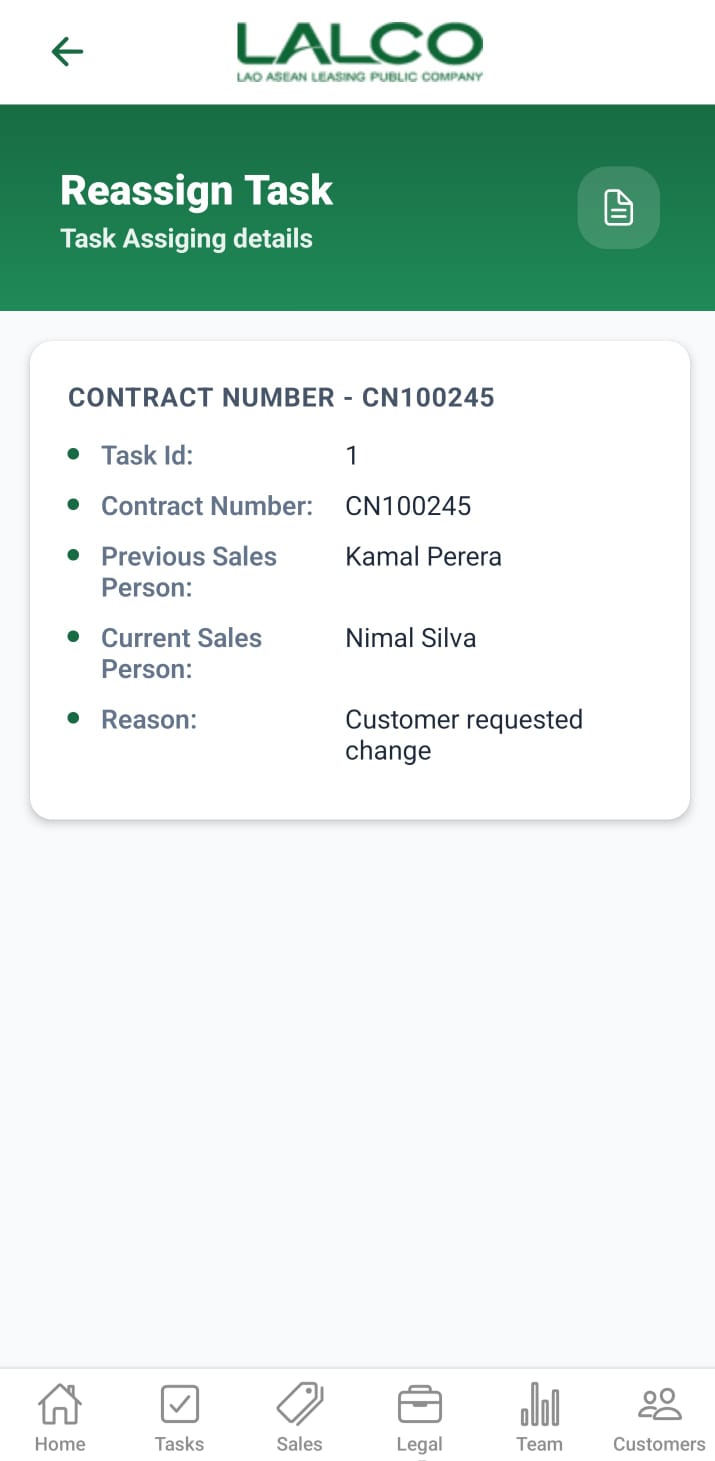
The **Reassign Task Details Screen** shows detailed information about a specific reassigned task, including the reason for reassignment.

---

# Task Details Section

Displays key information:

- **Task ID** → Unique task identifier
- **Contract Number** → Related contract
- **Previous Sales Person**
- **Current Sales Person**
- **Reason** → Explanation for reassignment

---

### Example:

<div class="relative w-full mt-4 mb-1" id="bkmrk-task-id%3A-1-contract-"><div class=""><div class="relative"><div class="h-full min-h-0 min-w-0"><div class="h-full min-h-0 min-w-0"><div class="border border-token-border-light border-radius-3xl corner-superellipse/1.1 rounded-3xl"><div class="h-full w-full border-radius-3xl bg-token-bg-elevated-secondary corner-superellipse/1.1 overflow-clip rounded-3xl lxnfua_clipPathFallback"><div class="pe-11 pt-3"><div class="relative z-0 flex max-w-full"><div class="q9tKkq_viewer cm-editor z-10 light:cm-light dark:cm-light flex h-full w-full flex-col items-stretch ͼk ͼy" dir="ltr" id="bkmrk-task-id%3A-1-contract--1"><div class="cm-scroller"><div class="cm-content q9tKkq_readonly">Task ID: 1   
Contract Number: CN100245   
Previous Sales Person: Kamal Perera   
Current Sales Person: Nimal Silva   
Reason: Customer requested change</div></div></div></div></div></div></div></div></div><div class=""><div class="">  
</div></div></div></div></div>---

# How to Use

### View Task Details

1. Select a task from the list
2. Review all reassignment details

---

# Navigation

<div class="relative w-full mt-4 mb-1" id="bkmrk-reassigned-tasks-%E2%86%92-s"><div class=""><div class="relative"><div class="h-full min-h-0 min-w-0"><div class="h-full min-h-0 min-w-0"><div class="border border-token-border-light border-radius-3xl corner-superellipse/1.1 rounded-3xl"><div class="h-full w-full border-radius-3xl bg-token-bg-elevated-secondary corner-superellipse/1.1 overflow-clip rounded-3xl lxnfua_clipPathFallback"><div class="pe-11 pt-3"><div class="relative z-0 flex max-w-full"><div class="q9tKkq_viewer cm-editor z-10 light:cm-light dark:cm-light flex h-full w-full flex-col items-stretch ͼk ͼy" dir="ltr" id="bkmrk-reassigned-tasks-%E2%86%92-s-1"><div class="cm-scroller"><div class="cm-content q9tKkq_readonly">Reassigned Tasks → Select Task → View Details</div></div></div></div></div></div></div></div></div></div></div></div><div class="relative w-full mt-4 mb-1" id="bkmrk--14"><div class=""><div class="relative"><div class=""><div class="">  
</div></div></div></div></div>