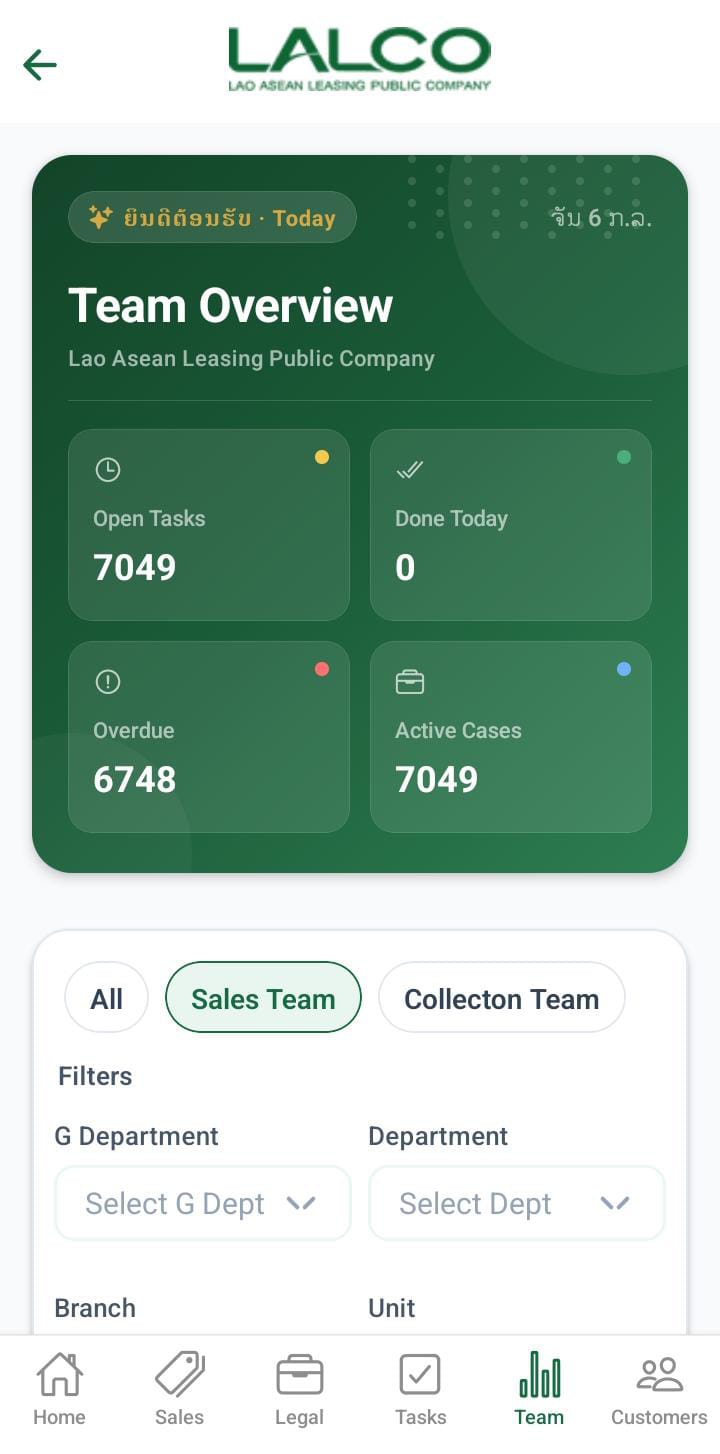
# Team Dashboard Screen

[![ce5b7113-7c70-496a-a5be-ee6714d3254b.jpg](http://wiki.lalco.la/uploads/images/gallery/2026-03/scaled-1680-/ce5b7113-7c70-496a-a5be-ee6714d3254b.jpg)](http://wiki.lalco.la/uploads/images/gallery/2026-03/ce5b7113-7c70-496a-a5be-ee6714d3254b.jpg)

The **Team Dashboard Screen** provides a quick overview of team performance, task distribution, and case analytics. It helps staff monitor daily progress, track workloads, and identify top performers.

---

# Header Section

### Date Indicator

Displays the current working day.

Example:

<div class="relative w-full mt-4 mb-1" id="bkmrk-today-%2F-thu%2C-mar-19"><div class=""><div class="relative"><div class="h-full min-h-0 min-w-0"><div class="h-full min-h-0 min-w-0"><div class="border border-token-border-light border-radius-3xl corner-superellipse/1.1 rounded-3xl"><div class="h-full w-full border-radius-3xl bg-token-bg-elevated-secondary corner-superellipse/1.1 overflow-clip rounded-3xl lxnfua_clipPathFallback"><div class="pe-11 pt-3"><div class="relative z-0 flex max-w-full"><div class="q9tKkq_viewer cm-editor z-10 light:cm-light dark:cm-light flex h-full w-full flex-col items-stretch ͼk ͼy" dir="ltr" id="bkmrk-today-%2F-thu%2C-mar-19-1"><div class="cm-scroller"><div class="cm-content q9tKkq_readonly">Today / Thu, Mar 19</div></div></div></div></div></div></div></div></div><div class=""><div class="">  
</div></div></div></div></div>---

### Page Title

**Team Pulse**

Shows that this section focuses on **team activity and performance**.

---

# Team Summary Cards

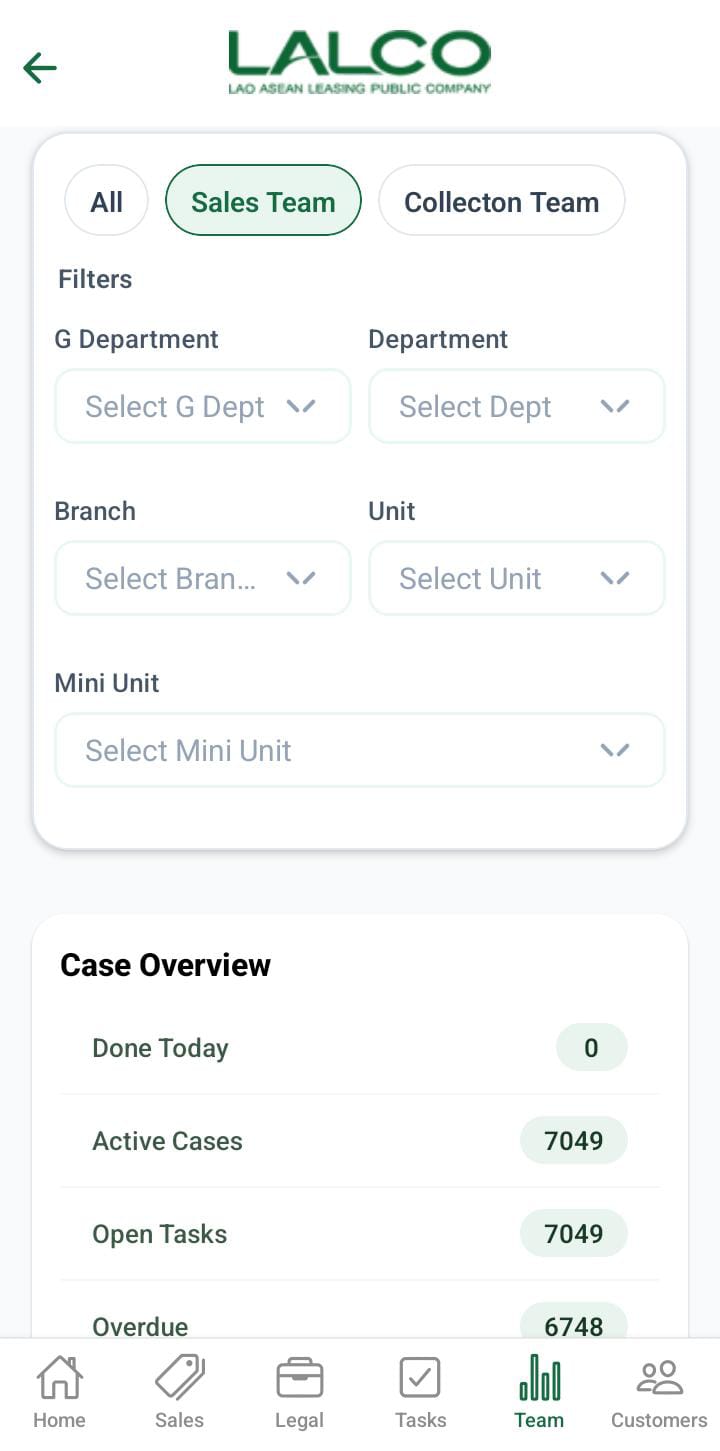
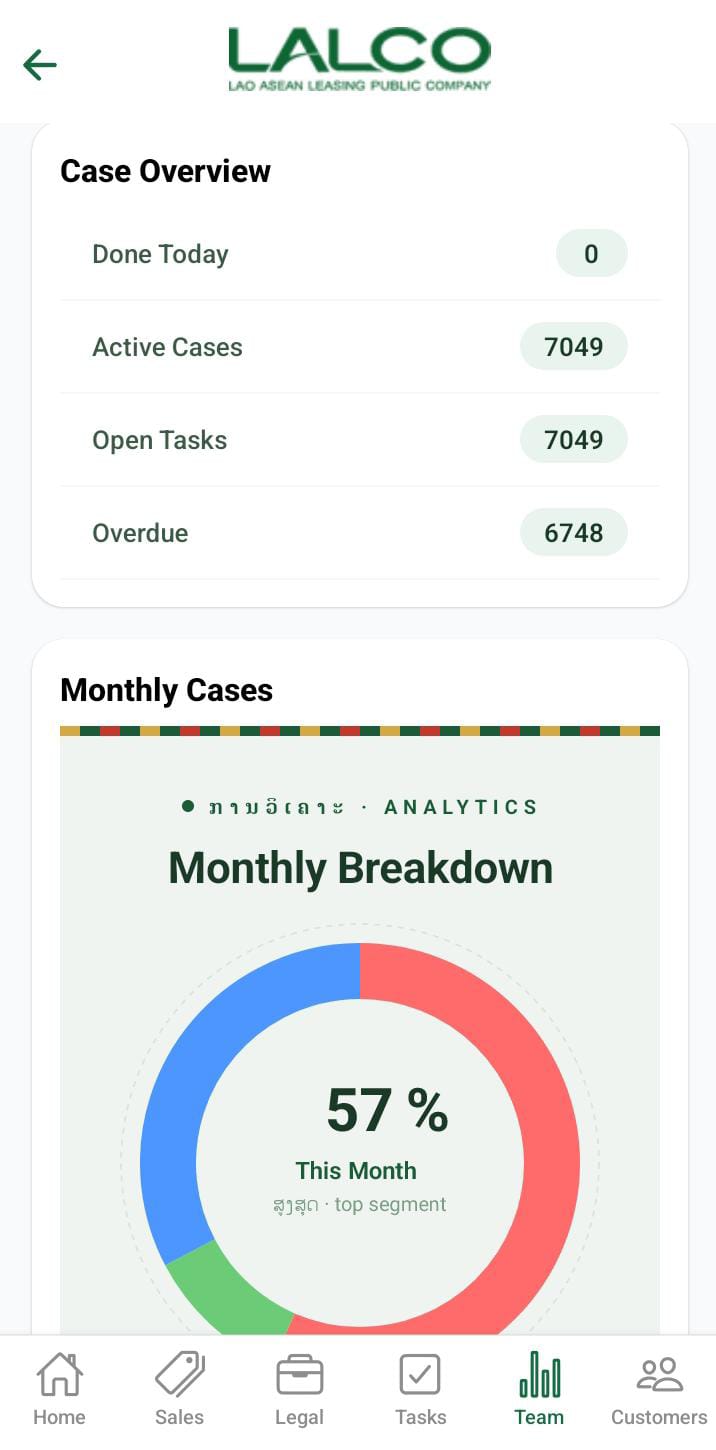
This section provides a quick snapshot of team activity:

- **Open Tasks** → Total number of tasks not yet completed
- **Done Today** → Tasks completed on the current day
- **Overdue** → Tasks that have passed their deadline
- **Active Cases** → Total ongoing cases handled by the team

---

# Department Tasks

### Tabs

Users can switch between departments:

- **Collections**
- **Sales**
- **Legal**

This allows viewing performance data for each department separately.

---

# Analytics Section

### Department Task Share

Displays a visual chart showing task distribution.

Example:

<div class="relative w-full mt-4 mb-1" id="bkmrk-67%25-collections-sele"><div class=""><div class="relative"><div class="h-full min-h-0 min-w-0"><div class="h-full min-h-0 min-w-0"><div class="border border-token-border-light border-radius-3xl corner-superellipse/1.1 rounded-3xl"><div class="h-full w-full border-radius-3xl bg-token-bg-elevated-secondary corner-superellipse/1.1 overflow-clip rounded-3xl lxnfua_clipPathFallback"><div class="pe-11 pt-3"><div class="relative z-0 flex max-w-full"><div class="q9tKkq_viewer cm-editor z-10 light:cm-light dark:cm-light flex h-full w-full flex-col items-stretch ͼk ͼy" dir="ltr" id="bkmrk-67%25-collections-sele-1"><div class="cm-scroller"><div class="cm-content q9tKkq_readonly">67% Collections Selected</div></div></div></div></div></div></div></div></div><div class=""><div class="">  
</div></div></div></div></div>---

### Task Breakdown

- **Done** → Completed tasks
- **Remaining** → Pending tasks

Each includes:

- Task count
- Percentage progress

---

### Total Tracked

Shows the total number of tasks being monitored.

Example:

<div class="relative w-full mt-4 mb-1" id="bkmrk-total-tracked%3A-9"><div class=""><div class="relative"><div class="h-full min-h-0 min-w-0"><div class="h-full min-h-0 min-w-0"><div class="border border-token-border-light border-radius-3xl corner-superellipse/1.1 rounded-3xl"><div class="h-full w-full border-radius-3xl bg-token-bg-elevated-secondary corner-superellipse/1.1 overflow-clip rounded-3xl lxnfua_clipPathFallback"><div class="pe-11 pt-3"><div class="relative z-0 flex max-w-full"><div class="q9tKkq_viewer cm-editor z-10 light:cm-light dark:cm-light flex h-full w-full flex-col items-stretch ͼk ͼy" dir="ltr" id="bkmrk-total-tracked%3A-9-1"><div class="cm-scroller"><div class="cm-content q9tKkq_readonly">Total Tracked: 9</div></div></div></div></div></div></div></div></div><div class=""><div class="">  
</div></div></div></div></div>---

# Department Summary

Displays task details for the selected department.

Example (Collections):

- **Open** → 6
- **Done** → 3
- **Total** → 9

---

# View More Option

### View More Button

[![9625d44e-d4fe-439b-b478-1ee302467325.jpg](http://wiki.lalco.la/uploads/images/gallery/2026-03/scaled-1680-/9625d44e-d4fe-439b-b478-1ee302467325.jpg)](http://wiki.lalco.la/uploads/images/gallery/2026-03/9625d44e-d4fe-439b-b478-1ee302467325.jpg)

Expands the dashboard to show additional analytics and detailed data.

---

# Top Performers Section

### Top Performers (Today)

Displays staff members with the highest task completion.

Example:

- Alex Rivera → 5 tasks
- Priya Nair → 4 tasks
- Chen Wei → 3 tasks

---

# Additional Analytics (Expanded View)

When expanded, the dashboard shows deeper insights:

---

### Case Statistics

- **Total Cases** → Overall number of cases
- **Paid** → Successfully completed/paid cases
- **Not Paid** → Pending or unpaid cases

---

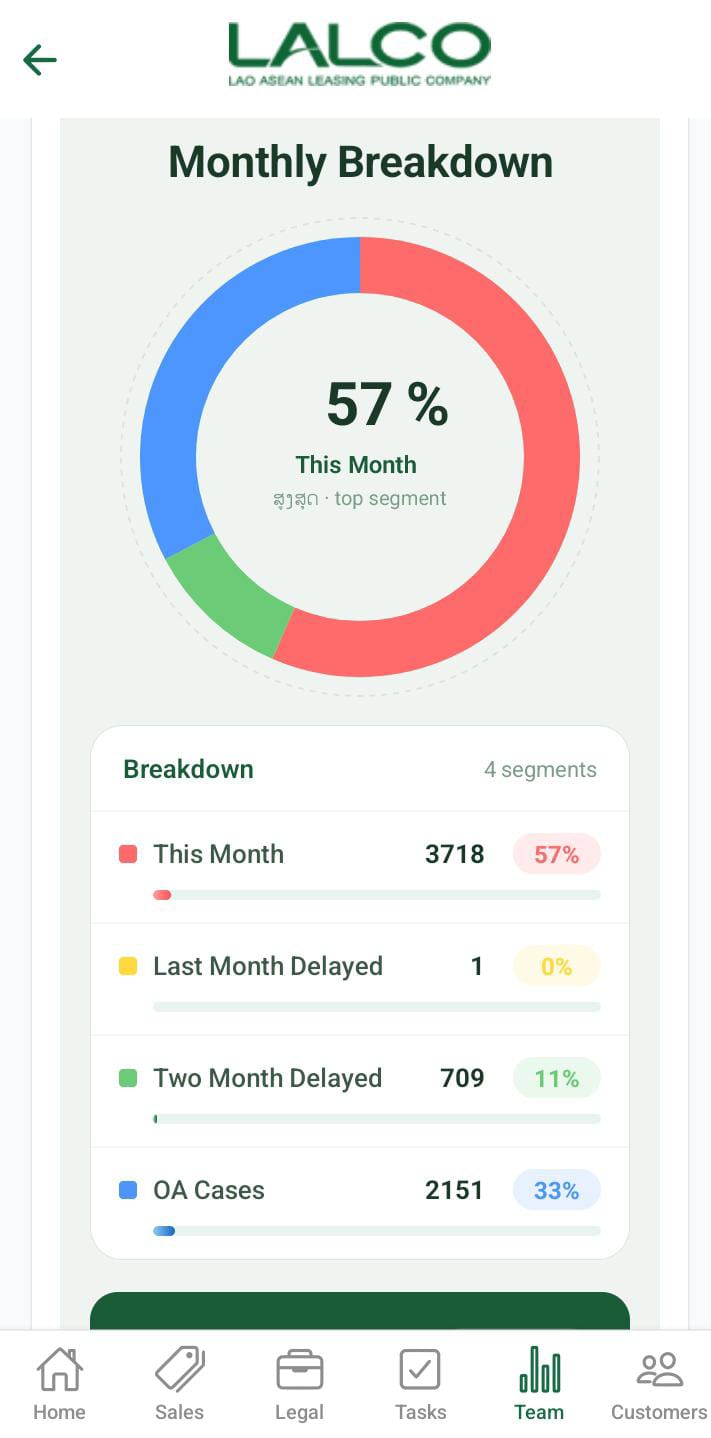
### Monthly Cases

Displays a visual breakdown of case categories.

Includes:

- **This Month**
- **Last Month**
- **2 Month Delayed**
- **OA Cases**
- **SOA Cases**

Each shows:

- Number of cases
- Percentage contribution

---

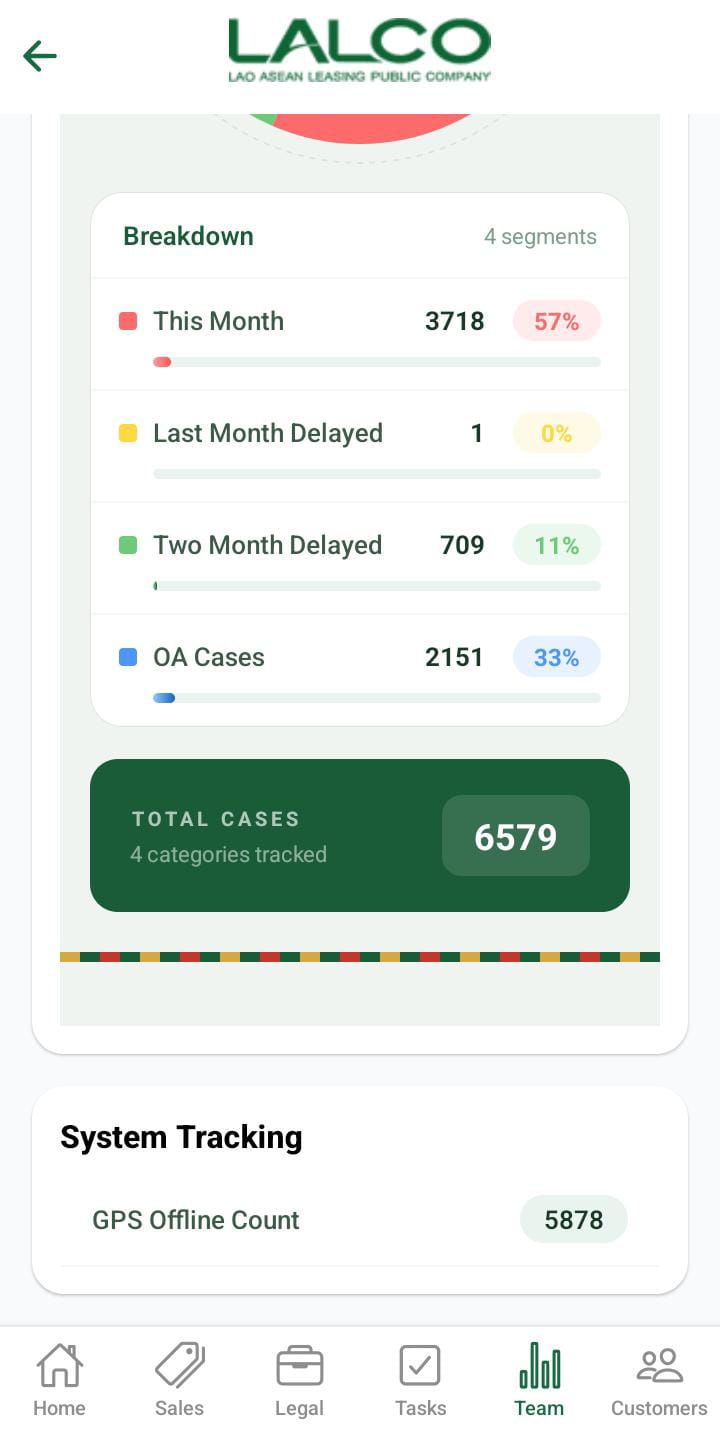
### Total Tracked (Analytics)

Shows total number of tracked segments.

Example:

<div class="relative w-full mt-4 mb-1" id="bkmrk-total-tracked%3A-67"><div class=""><div class="relative"><div class="h-full min-h-0 min-w-0"><div class="h-full min-h-0 min-w-0"><div class="border border-token-border-light border-radius-3xl corner-superellipse/1.1 rounded-3xl"><div class="h-full w-full border-radius-3xl bg-token-bg-elevated-secondary corner-superellipse/1.1 overflow-clip rounded-3xl lxnfua_clipPathFallback"><div class="pe-11 pt-3"><div class="relative z-0 flex max-w-full"><div class="q9tKkq_viewer cm-editor z-10 light:cm-light dark:cm-light flex h-full w-full flex-col items-stretch ͼk ͼy" dir="ltr" id="bkmrk-total-tracked%3A-67-1"><div class="cm-scroller"><div class="cm-content q9tKkq_readonly">Total Tracked: 67</div></div></div></div></div></div></div></div></div><div class=""><div class="">  
</div></div></div></div></div>---

### Case Types &amp; Tracking

Displays system-related tracking information.

Example:

- **GPS Offline** → Indicates location tracking issues

---

# How to Use

### View Team Performance

1. Open the **Team tab**
2. Review summary cards
3. Analyze department performance

---

### Switch Department

1. Tap **Collections / Sales / Legal**
2. View updated analytics

---

### Expand Analytics

1. Tap **View More**
2. Review detailed reports

---

💡 **Tip:**  
Use this screen daily to monitor **team productivity, overdue tasks, and performance trends**.